
SSH Port Forwarding - Socks Complete Operational Guide
Author:
Published On: Feb 14, 2026
Updated On: Mar 30, 2026
SSH pivoting is one of the most reliable and controlled techniques for lateral movement during internal assessments.
When you understand how traffic flows, SSH alone is sufficient to:
- Expose internal-only services
- Reach segmented networks
- Build a full SOCKS-based pivot infrastructure
- Perform multi-hop traversal
- Maintain encrypted tunnels with minimal tooling
Why Use SSH for Pivoting?
Compared to many dedicated pivoting tools, SSH is significantly simpler. In most cases, a single command is enough to establish a tunnel—no agent deployment, no additional binaries, and no complex setup.
SSH clients are installed by default on most operating systems. In some environments, you may need to enable or install the SSH server component, but this is usually trivial compared to deploying third-party tooling.
Constraints
You must have valid SSH credentials. If your access is limited to a reverse shell or another non-SSH shell, SSH pivoting is not possible. In such cases, you should consider alternative pivoting tools (for example, user-space tunneling or agent-based solutions).
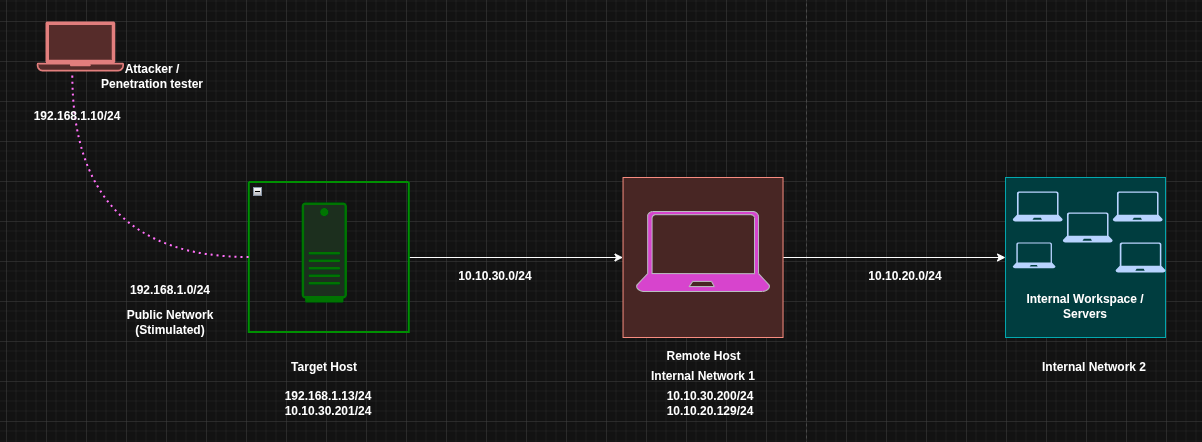
1️⃣ Lab Architecture
Scenario Overview
| Target | Primary IP | Secondary IP | Open Ports | Role |
|---|---|---|---|---|
| Attacker (Kali) | 192.168.1.10 | N/A | N/A | Attack Box |
| Target (Victim) | 192.168.1.13 | 10.10.30.201 | 127.0.0.1:8006 | Jump Host |
| Remote Target | 10.10.30.200 | 10.10.20.129 | 0.0.0.0:9876 | Internal Host |
| Internal Resources | 10.10.20.128 | N/A | — | Nested Network |
Assumptions
- You have SSH access to the Target
- An SSH server is running on the Target and on Attacker (for reverse scenarios)
- The target system can reach internal networks
- The attacker cannot directly reach internal networks
- The listed open ports are running HTTP services (the same logic applies to any TCP service)
2️⃣ Core Mental Model
Before executing any commands, it is critical to understand how SSH port-forwarding modes behave. Each option defines who initiates the connection, where the listener is created, and what problem it solves.
| Option | Connection Initiator | Listener Created On | Primary Use Case |
|---|---|---|---|
-R | Target | Attacker | Expose an internal service back to the attacker |
-L | Attacker | Attacker | Access a specific internal service via the target |
-D | Attacker | Attacker | Create a full SOCKS proxy for broad pivoting |
3️⃣ Local Port Forwarding (-L)
When using the local forwarding option (-L), the attacker connects to the target. In this setup, the attacker machine acts as the SSH client, and the target runs the SSH server.
There are two common scenarios when using -L:
- Accessing a local service running on the target host
- Accessing a service running on a remote/internal host that is reachable only from the target Both scenarios are covered below.
First Scenario with (-L) – Expose a Local Service from the Target
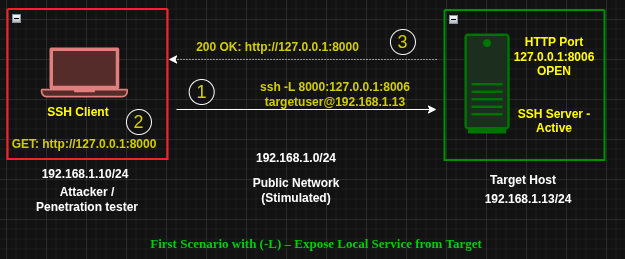
Situation
- The target runs a web service on
127.0.0.1:8006 - The service is not externally accessible
- You have SSH access to the target
Execute on ATTACKER
ssh -L 0.0.0.0:8000:127.0.0.1:8006 targetuser@192.168.1.13
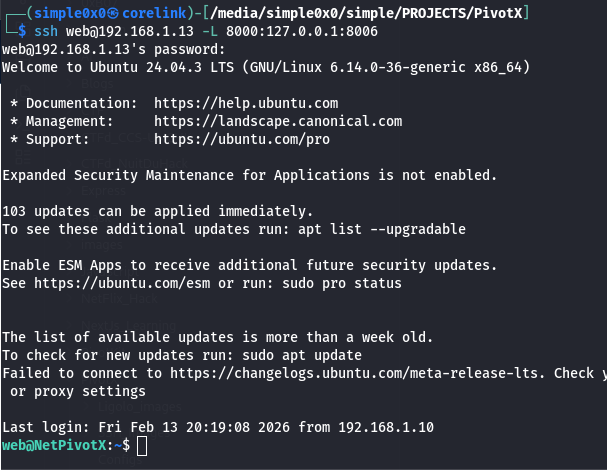
What Happens
- An SSH connection is established from the attacker to the target
- Port 8000 is opened on the attacker machine
- Traffic sent to http://127.0.0.1:8000 is forwarded to 127.0.0.1:8006 on the target
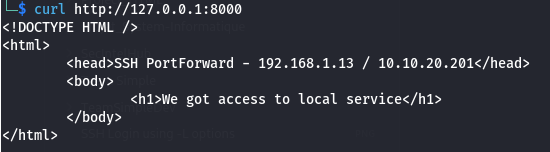
[!NOTE] To restrict exposure:
Be cautious when binding to0.0.0.0, as this exposes the service to the entire network.
Bind explicitly to localhost instead:ssh -L 127.0.0.1:8000:127.0.0.1:8006 [email protected]Then access the service viahttp://127.0.0.1:8000.
You can define multiple port forwards by repeating the-Loption.
Second Scenario with (-L) – Access a Service on a Remote Host
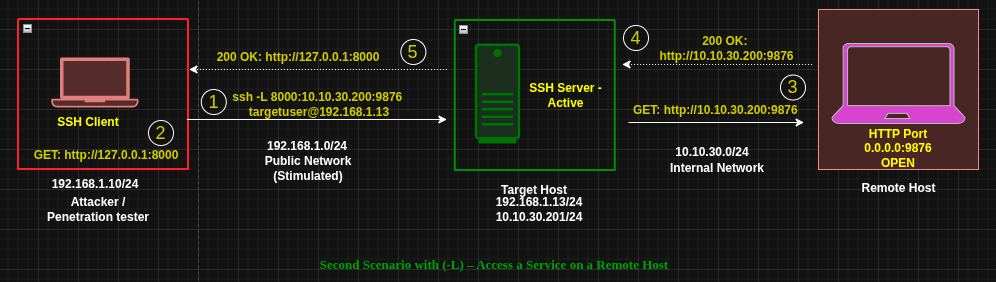
Situation
- The target can access an internal host at
10.10.30.200:9876 - The attacker cannot reach this host directly
- You have SSH access to the target
Execute on ATTACKER
ssh -L 0.0.0.0:8000:10.10.30.200:9876 targetuser@192.168.1.13
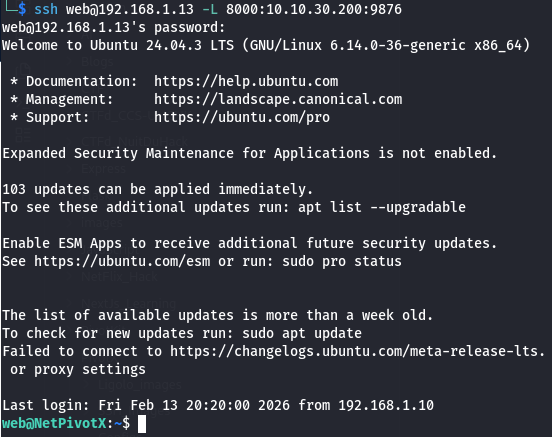
What Happens
- An SSH connection is established from the attacker to the target
- Port
8000is opened on the attacker machine - Traffic sent to
attacker:8000is forwarded through the target to10.10.30.200:9876
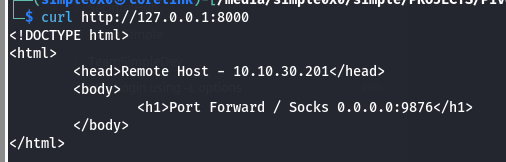
[!NOTE] To restrict exposure:
Avoid binding to0.0.0.0unless explicitly required.ssh -L 127.0.0.1:8000:10.10.30.200:9876 [email protected]Access the service locally viahttp://127.0.0.1:8000.
Multiple forwards can be configured by repeating the-Loption.
4️⃣ Remote Port Forwarding (-R)
When using remote (reverse) port forwarding (-R), the target initiates the SSH connection back to the attacker. In this case, the target acts as the SSH client, and the attacker runs the SSH server.
Requirement
The SSH server configuration on the attacker must allow remote bindings.
In /etc/ssh/sshd_config, ensure the following is set and uncommented:
GatewayPorts yes
As with local forwarding, there are two primary scenarios:
- Exposing a local service running on the target
- Exposing a service on a remote/internal network reachable only from the target
Let's explore each of the scenario below.
First Scenario with (-R) – Expose Local Service from Target
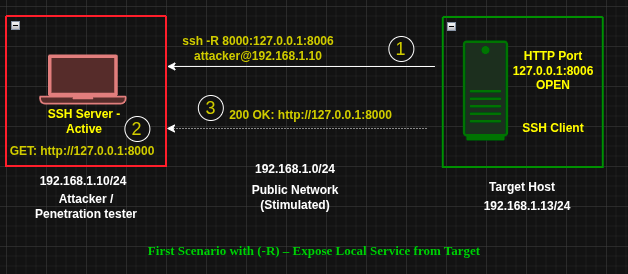
Situation
- Same setup as the first
-Lscenario - The target hosts a local-only service on
127.0.0.1:8006
Execute on TARGET
ssh -R 0.0.0.0:8000:127.0.0.1:8006 [email protected]
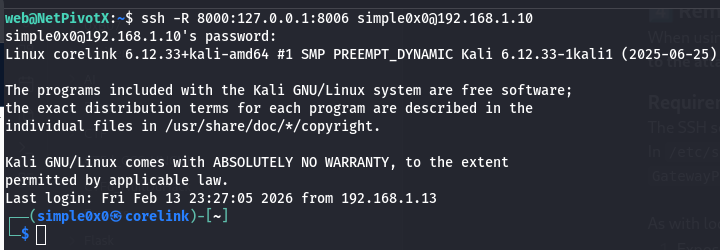
What Happens
- The target initiates an SSH connection to the attacker
- Port
8000is opened on the attacker machine - Traffic sent to
attacker:8000is forwarded to127.0.0.1:8006on the target
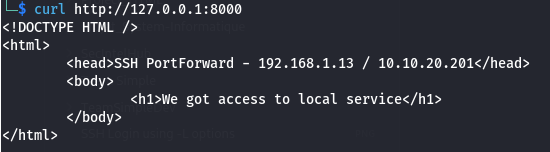
Access the service from the attacker:
http://ATTACKER_IP:8000
[!NOTE] The same exposure restrictions discussed in the first
-Lscenario apply here.
Second Scenario with (-R) – Access a Service on a Remote Host
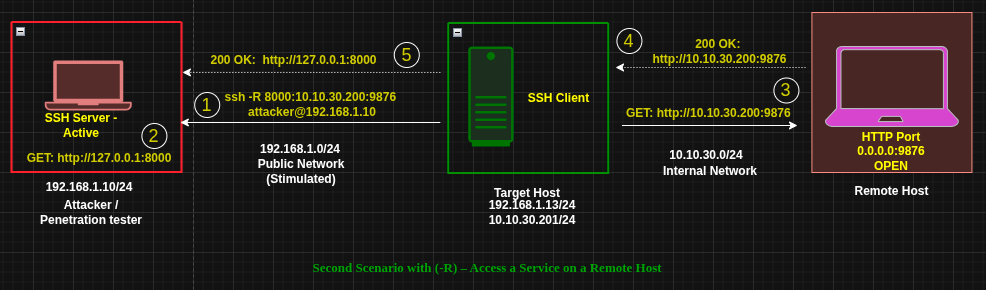
Situation
- Same setup as the second
-Lscenario - The target can access an internal service at
10.10.30.200:9876
Execute on TARGET
ssh -R 0.0.0.0:8000:10.10.30.200:9876 attacker@192.168.1.10
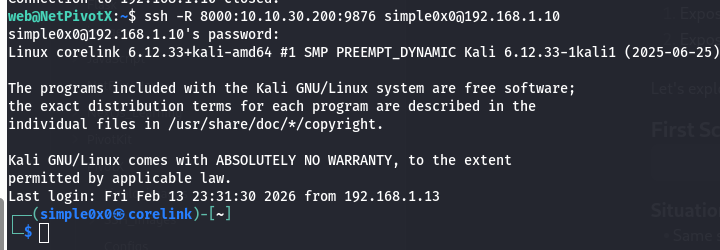
What Happens
- The target initiates an SSH connection to the attacker
- Port
8000is opened on the attacker machine - Traffic sent to
attacker:8000is tunneled through the target to10.10.30.200:9876
Access the service from the attacker: http://ATTACKER_IP:8000
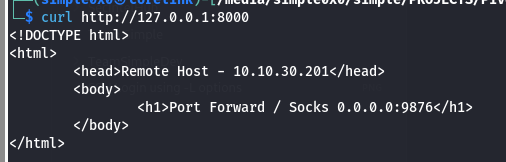 You are now accessing an internal service without direct access to the internal network.
[!NOTE] The same exposure considerations from the second
-Lscenario apply here.
When to Use -R
- Reverse shell–only access
- NAT or firewall blocking inbound connections to the target
- The target can reach you, but you cannot reach the target
- You want internal or local target services exposed on your machine
5️⃣ Dynamic Port Forwarding (-D)
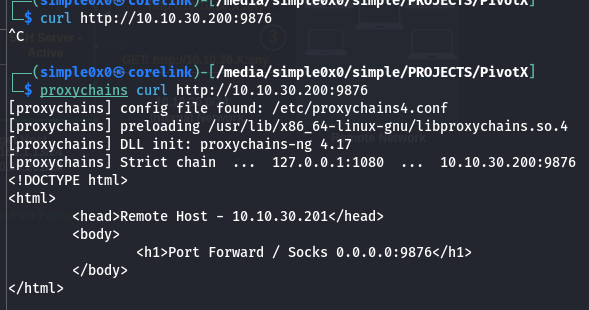
Dynamic port forwarding creates a SOCKS proxy, providing access to the entire reachable network rather than a single service.
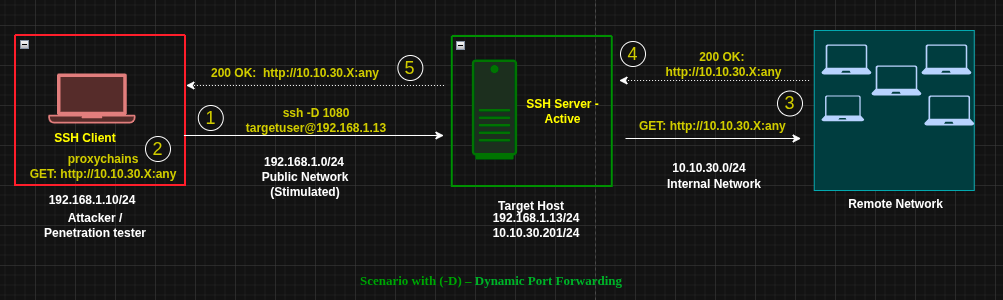
Execute on ATTACKER
ssh -D 1080 targetuser@192.168.1.13
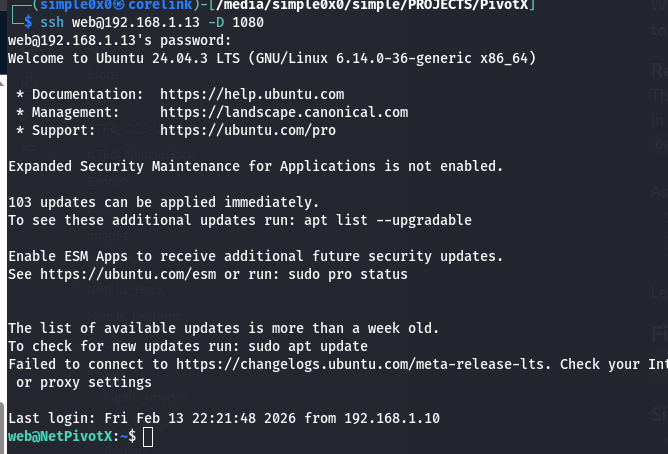
What Happens
- SSH connection is established to the target
- A SOCKS proxy listens on
127.0.0.1:1080 - All proxied traffic is routed through the target
You now have logical presence inside the target’s network.
To be able to access services on the remote network directly, you need to use proxychains or any proxy tool available to you.
Proxychains Configuration
Edit /etc/proxychains.conf or /etc/proxychains4.conf:
<SNIP> [ProxyList] # add proxy here ... # meanwile # defaults set to "tor" #socks4 127.0.0.1 9050 socks5 127.0.0.1 1080 <SNIP>
Usage Examples
proxychains nmap -sT -Pn 10.10.30.0/24 proxychains evil-winrm -i host -u user -H hash
Browser Configuration
- SOCKS5 Proxy:
127.0.0.1 - Port:
1080All web traffic routes through target.
6️⃣ Double Pivot with SSH
SSH supports multi-hop and chained pivoting if you have credentials on additional internal hosts.
This guide does not cover that setup in detail, but the same principles apply.
7️⃣ Choosing Between -L, -R, and -D
- Expose victim service to you →
-R - Access a specific internal service →
-L - Scan or access a full subnet →
-D - Reverse NAT or inbound block →
-R - Full browser pivot →
-D
8️⃣ Traffic Visibility & OPSEC
SSH tunnels:
- Encrypted
- Blend with normal SSH traffic
- Can use common ports (e.g., 443)
- Leave minimal disk artifacts
However:
- SSH connections are logged
- Port forwards may trigger monitoring
- Long-lived tunnels are visible via
netstatand similar tools
9️⃣ Strategic Perspective
SSH pivoting is:
- Lightweight
- Native
- Encrypted
- Stable
- Widely available
It does not require:
- Kernel drivers
- Custom binaries
- TUN interfaces
- External frameworks
It does require:
- Clear understanding of traffic direction
- Proper routing awareness
- Strict exposure discipline
Final Mental Model
-R→ Victim exposes services to attacker-L→ Attacker reaches services through victim-D→ Attacker becomes logically inside the victim network
If you understand:
- Who initiates the connection
- Where the listening port is created
- How traffic flows after the tunnel
Then SSH pivoting becomes a controlled routing exercise—not guesswork.
Latest
Events
Team Simple - All Rights Reserved ©